Instead of collecting interest manually and managing attendance through messages, spreadsheets, or external tools, you can create an event in Bridebook, share the booking link, and let couples reserve their place instantly.
Open Days sit alongside private viewings, giving venues another way to bring couples through the door and manage event interest in one place.

What are Open Days?
Open Days are scheduled events where multiple couples can visit your venue during a set time.
They are ideal for venues that want to:
-
showcase their space to several couples at once
-
create momentum around key booking periods
-
make it easier for couples to visit in person
-
reduce manual admin when managing event sign-ups
-
re-engage couples who are already considering the venue
Some venues may also use Open Days to introduce couples to trusted suppliers, such as musicians, stylists, or caterers.
Open Days vs Showrounds
Open Days and private viewings serve different purposes.
Open Days
-
Designed for multiple couples
-
More flexible and lower commitment
-
Usually planned further in advance
-
Better suited to broad discovery and early-stage interest
-
Automatically approved when couples book
Showrounds
-
Designed for one couple at a time
-
More personalised
-
Often booked closer to the date
-
Better suited to couples with stronger intent
-
Follow the private viewing booking flow
Bridebook allows venues to offer both, so couples can choose the type of visit that suits them best.
Why use Open Days on Bridebook?
Let couples book instantly
Couples can reserve a place directly from your profile without needing to email first.
Reduce manual work
Bridebook handles the booking flow and sends reminders automatically, helping to reduce back-and-forth admin.
Keep everything in one place
Bookings feed into your Bridebook workflow, making it easier to manage viewings and follow up with couples.
Control attendance
You can set a capacity for the event so you stay in control of numbers.
Share the booking link anywhere
Each Open Day has a shareable link, so you can promote it on social media, by email, on your website, or in direct conversations with couples.
Manage both Bridebook and non-Bridebook couples
Venues can add couples to an Open Day manually, including couples who are not already using Bridebook.
How Open Days work
Once an Open Day is set up, couples can book themselves in directly.
Unlike private viewings, Open Days use automatic approval. This means couples do not need to wait for the venue to confirm their place manually.
This makes Open Days quicker and simpler to manage, especially when multiple couples may be attending.
Couples and venues receive booking notifications, and couples also receive reminders ahead of the event.
How to create an Open Day
To create an Open Day in Bridebook Business:
-
Go to your calendar or event area
-
Select the option to create an Open Day
-
Add your event title
-
Choose the date and time
-
Set the event capacity
-
Add a description so couples know what to expect
-
Add any optional questions you’d like couples to answer when booking
-
Save and publish the event
Your event will then appear as a bookable option on your venue profile.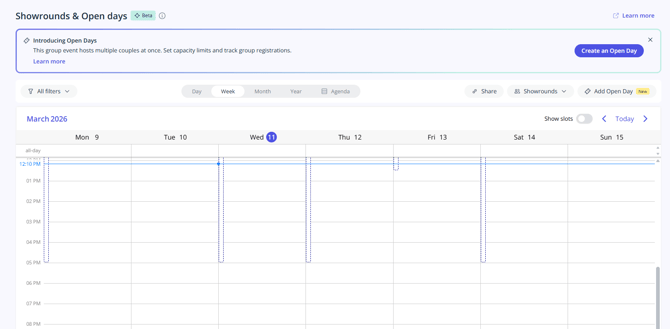
What information can you add?
When setting up an Open Day, you can include:
-
the title of the event
-
the date and start time
-
the event duration
-
the attendee limit
-
a description of what couples can expect
-
any practical details that may help couples prepare
-
optional booking questions
This gives couples a clear idea of the event before they reserve a place.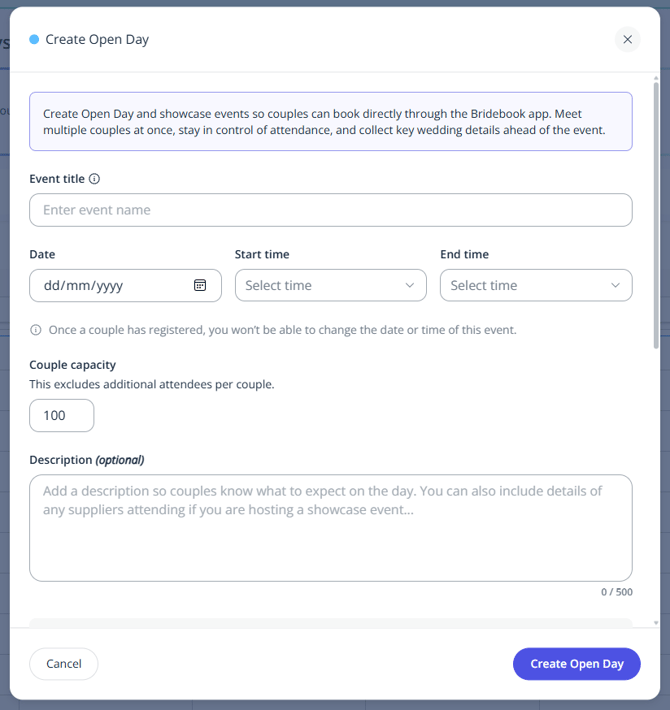
Managing attendee limits
You can set a maximum number of attendees for your Open Day.
If the event reaches capacity, couples may still be able to see that the Open Day exists, but they will not be able to join once it is full.
This helps venues keep control of attendance while still showing upcoming events on their profile.
How couples find your Open Day
On your Bridebook profile, couples can click Arrange a Viewing.
If you offer both private viewings and Open Days, they’ll be able to choose between them on the booking screen.
This makes it easier for couples to pick the type of visit that fits where they are in their planning journey.
Shareable booking links
Every Open Day has a shareable booking link.
This link can be used across your marketing channels and will continue to show the relevant future events available for booking, helping couples always land in the right place.
This makes it useful for:
-
email campaigns
-
Instagram and Facebook posts
-
website buttons
-
enquiry follow-ups
-
direct messages to interested couples

Managing bookings
Once couples have booked, you can:
-
view who is attending
-
remove attendees if needed
-
add couples manually
-
export the attendee list
-
move between event management and Couples Manager
This helps venues keep event planning organised before the day itself.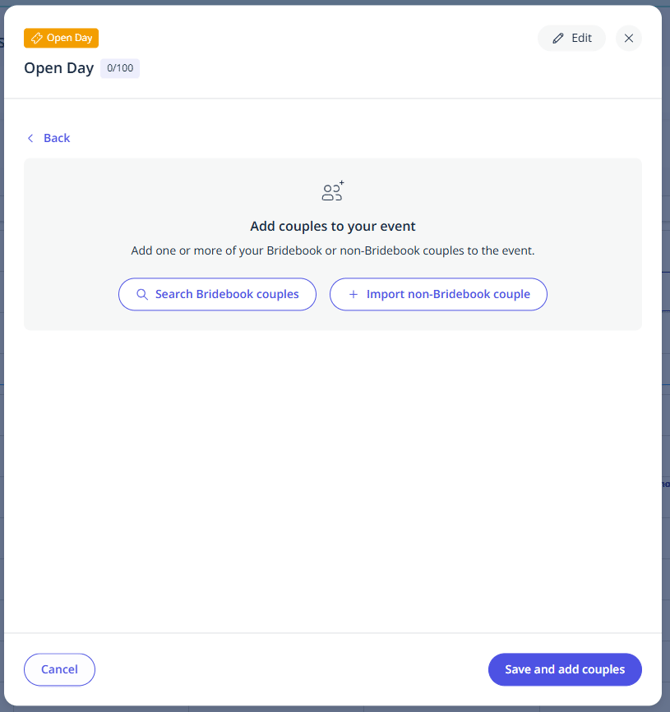
Exporting attendee lists
You can export your attendee list in CSV or Excel format.
This is useful if your team wants to:
-
keep a digital attendance list
-
print a register for the day
-
coordinate event check-in offline
At the moment, exported attendee lists may not include answers to custom booking questions, so it is worth checking these separately in Bridebook if needed.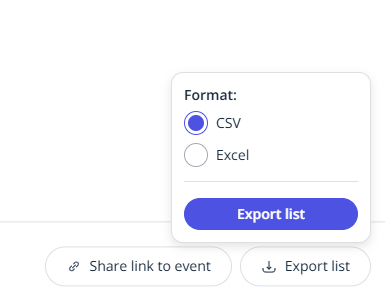
Booking reminders and notifications
When a couple books an Open Day, both the couple and the venue are notified.
Bridebook also sends reminders to couples before the event to help reduce no-shows and keep attendance clear.
Important things to know
-
Open Days are automatically approved
-
Both couples and venues can cancel a booking
-
If a couple updates their personal wedding details in Bridebook, those changes can update on the platform
-
Answers to custom booking questions may remain as originally submitted
-
Venues cannot currently change the date or time of an Open Day once couples have already been added
Because of this, it’s best to double-check event details before publishing.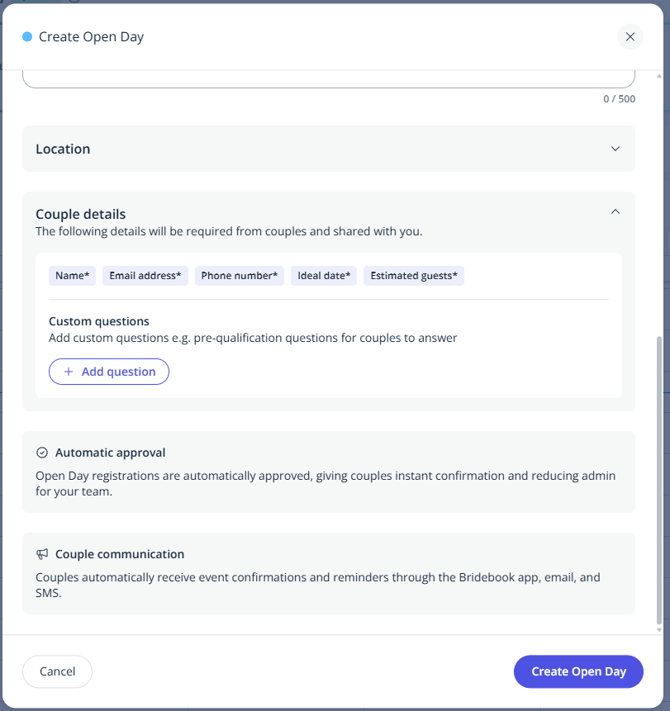
Tips for getting the most out of Open Days
To make your Open Day as effective as possible:
-
create the event well in advance
-
write a clear, engaging description
-
mention anything special happening on the day
-
set a realistic capacity
-
share the booking link across all your channels
-
offer both Open Days and private viewings if possible
-
use attendee exports to prepare your team for the day
Open Days work best when they are easy to discover, easy to book, and clearly explained.
If you need help setting up your first Open Day, our Support Team is here to help.