---
title: Edit Your Business Profile
description: To keep your profile updated, head over to business.bridebook.com. Log in with your email address and password and you should be all set. The more you update your profile, the higher your profile sco
---
[Skip to content](https://support.bridebook.com/en/edit-your-business-profile#main-content)
- [English](https://support.bridebook.com/en/edit-your-business-profile)
- [Deutsch](https://support.bridebook.com/de/wie-kann-ich-mein-profil-aktualisieren)
- [Français](https://support.bridebook.com/fr/comment-faire-pour-mettre-mon-profil-à-jour)
- [Polski](https://support.bridebook.com/pl/how-can-i-update-my-profile)
English
Show submenu for translations
[Contact us](https://support.bridebook.com/en/kb-tickets/new?hsLang=en)
![Group 20534 (1).png\]](https://support.bridebook.com/hs-fs/hubfs/Group%2020534%20(1).png?height=20&name=Group%2020534%20(1).png)
- [Home](https://support.bridebook.com/en)
- [Products](https://support.bridebook.com/en/bridebook-tiers-membership-plans-)
- [Company](https://partners.bridebook.com/)
Open main navigation
Close main navigation
- [Home](https://support.bridebook.com/en)
- [Products](https://support.bridebook.com/en/bridebook-tiers-membership-plans-)
- [Company](https://partners.bridebook.com/)
- - [English](https://support.bridebook.com/en/edit-your-business-profile)
- [Deutsch](https://support.bridebook.com/de/wie-kann-ich-mein-profil-aktualisieren)
- [Français](https://support.bridebook.com/fr/comment-faire-pour-mettre-mon-profil-à-jour)
- [Polski](https://support.bridebook.com/pl/how-can-i-update-my-profile)
English
Show submenu for translations
- [Contact us](https://support.bridebook.com/en/kb-tickets/new)
- [Visit Bridebook Business](https://partners.bridebook.com/)
[Visit Bridebook Business](https://partners.bridebook.com/?hsLang=en)
Everything you need to know
- There are no suggestions because the search field is empty.
1. [Bridebook Business Support](https://support.bridebook.com/en?hsLang=en)
2. [Edit My Profile](https://support.bridebook.com/en/edit-my-profile?hsLang=en)
# Edit Your Business Profile
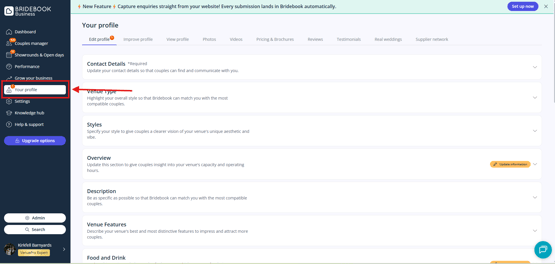
To update your profile, log in to [**business.bridebook.com**](https://business.bridebook.com/login?_gl=1*qkuyrv*_gcl_au*MTA3NDE2NzgxOS4xNzgwMzIyODMyLjM4NzU4MDQxMy4xNzgwMzIyODUwLjE3ODAzMjI4NDk.*_ga*MjA1MDg2NTg2MS4xNzgwMzIyODE3*_ga_GM5GJ6SFMB*czE3ODAzMjcwOTYkbzIkZzAkdDE3ODAzMjcwOTYkajYwJGwwJGgxMTEyNDU4NQ..) using your email address and password, then select [**Your Profile**](https://business.bridebook.com/profile/overview) from the menu on the left-hand side.
Within this section, you can manage your venue information, images, pricing, features, and other profile details to ensure couples always see the most accurate and up-to-date information.
### Using the **Improve Profile** Tool
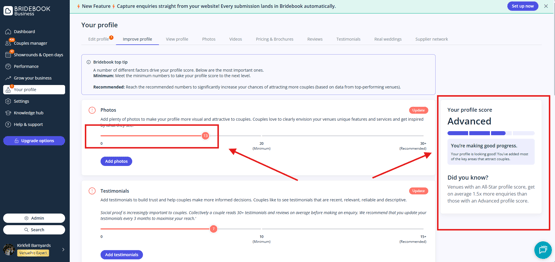
Whether you're new to Bridebook or simply looking to strengthen your profile, the [**Improve Profile**](https://business.bridebook.com/profile/improve) section is a great place to start.
This tool highlights areas where your profile could be enhanced and provides a clear overview of your profile's completeness. We recommend working towards getting all profile sliders into the **green** wherever possible, as this helps ensure your profile is in the strongest position to attract couples.
### Why Profile Completion Matters
A complete and well-maintained profile helps couples better understand what your venue offers and can improve your visibility on Bridebook.
Regularly reviewing and updating your profile ensures you're showcasing your venue at its best and making the most of your presence on the platform. ✨
### Need help?
If you need assistance updating your profile or understanding your profile score, please contact our Customer Service team.
👉**[Contact Us](https://share.hsforms.com/1ZZN12s9aQoapXz9Dpu2Y0A1p8l9)**
- [About Bridebook](https://support.bridebook.com/en/about-bridebook?hsLang=en#main-content)
- [Who We Are](https://support.bridebook.com/en/about-bridebook?hsLang=en#who-we-are)
- [T&Cs & GDPR](https://support.bridebook.com/en/about-bridebook?hsLang=en#tcs-gdpr)
- [Tell Us What You Think](https://support.bridebook.com/en/about-bridebook?hsLang=en#tell-us-what-you-think)
- [Customer Service](https://support.bridebook.com/en/about-bridebook?hsLang=en#customer-service)
- [Join Bridebook Business](https://support.bridebook.com/en/join-bridebook-business?hsLang=en#main-content)
- [Getting Started](https://support.bridebook.com/en/join-bridebook-business?hsLang=en#getting-started)
- [About Bridebook Business](https://support.bridebook.com/en/join-bridebook-business?hsLang=en#about-bridebook-business)
- [Tiers and Premium Memberships](https://support.bridebook.com/en/tiers-and-premium-memberships?hsLang=en#main-content)
- [VenuePro](https://support.bridebook.com/en/tiers-and-premium-memberships?hsLang=en#venuepro)
- [SupplierPro](https://support.bridebook.com/en/tiers-and-premium-memberships?hsLang=en#supplierpro)
- [Essentials](https://support.bridebook.com/en/tiers-and-premium-memberships?hsLang=en#essentials)
- [Search Boost](https://support.bridebook.com/en/tiers-and-premium-memberships?hsLang=en#search-boost)
- [Limited Profile](https://support.bridebook.com/en/tiers-and-premium-memberships?hsLang=en#limited-profile)
- [Premium Tools and Features](https://support.bridebook.com/en/premium-tools-and-features?hsLang=en#main-content)
- [Special Offers](https://support.bridebook.com/en/premium-tools-and-features?hsLang=en#special-offers)
- [Advanced Analytics](https://support.bridebook.com/en/premium-tools-and-features?hsLang=en#advanced-analytics)
- [Couple Targeting](https://support.bridebook.com/en/premium-tools-and-features?hsLang=en#couple-targeting)
- [Real Weddings](https://support.bridebook.com/en/premium-tools-and-features?hsLang=en#real-weddings)
- [Edit My Profile](https://support.bridebook.com/en/edit-my-profile?hsLang=en#main-content)
- [Search Position](https://support.bridebook.com/en/edit-my-profile?hsLang=en#search-position)
- [Profile Details](https://support.bridebook.com/en/edit-my-profile?hsLang=en#profile-details)
- [My Network](https://support.bridebook.com/en/edit-my-profile?hsLang=en#my-network)
- [Wedding Fairs](https://support.bridebook.com/en/edit-my-profile?hsLang=en#wedding-fairs)
- [Reviews & Testimonials](https://support.bridebook.com/en/edit-my-profile?hsLang=en#reviews-testimonials)
- [Photos](https://support.bridebook.com/en/edit-my-profile?hsLang=en#photos)
- [Videos](https://support.bridebook.com/en/edit-my-profile?hsLang=en#videos)
- [Social Media](https://support.bridebook.com/en/edit-my-profile?hsLang=en#social-media)
- [Manage My Couples](https://support.bridebook.com/en/manage-my-couples?hsLang=en#main-content)
- [Couples Manager](https://support.bridebook.com/en/manage-my-couples?hsLang=en#couples-manager)
- [The Website Widget](https://support.bridebook.com/en/manage-my-couples?hsLang=en#the-website-widget)
- [Manage My Account](https://support.bridebook.com/en/manage-my-account?hsLang=en#main-content)
- [Account Settings](https://support.bridebook.com/en/manage-my-account?hsLang=en#account-settings)
- [My Subscription](https://support.bridebook.com/en/manage-my-account?hsLang=en#my-subscription)
- [Badges](https://support.bridebook.com/en/manage-my-account?hsLang=en#badges)
- [New Releases](https://support.bridebook.com/en/new-releases?hsLang=en#main-content)
- [Whats New?](https://support.bridebook.com/en/new-releases?hsLang=en#whats-new)
- [International Couples](https://support.bridebook.com/en/new-releases?hsLang=en#international-couples)
- [Webinars & Wedding Reports](https://support.bridebook.com/en/webinars-wedding-reports?hsLang=en#main-content)
- [Wedding Reports from previous years](https://support.bridebook.com/en/webinars-wedding-reports?hsLang=en#wedding-reports-from-previous-years)
- [Webinars](https://support.bridebook.com/en/webinars-wedding-reports?hsLang=en#webinars)
- [Troubleshooting](https://support.bridebook.com/en/troubleshooting?hsLang=en#main-content)
- [Bridebook Account](https://support.bridebook.com/en/troubleshooting?hsLang=en#bridebook-account)
- [Logging In](https://support.bridebook.com/en/troubleshooting?hsLang=en#logging-in)
- [Email Issues](https://support.bridebook.com/en/troubleshooting?hsLang=en#email-issues)
- [Browsers](https://support.bridebook.com/en/troubleshooting?hsLang=en#browsers)
- [Error Messages](https://support.bridebook.com/en/troubleshooting?hsLang=en#error-messages)
[](http://bridebook.co.uk)
43 Manchester Street, London, W1U 7LP
Copyright © 2025, Bridebook Business (Main Office)