---
title: Google Chrome's Incognito Mode
description: Encountering a few errors when using Bridebook? Fear not – try the Chrome browser in Incognito Mode! 🕵️♂️ Chrome is the chosen companion for Bridebook. Its compatibility dances in harmony with our e
---
[Skip to content](https://support.bridebook.com/en/google-chromes-incognito-mode#main-content)
- [English](https://support.bridebook.com/en/google-chromes-incognito-mode)
- [Deutsch](https://support.bridebook.com/de/wie-benutze-ich-den-inkognito-modus-von-chrome)
- [Français](https://support.bridebook.com/fr/comment-utiliser-le-mode-incognito-de-chrome)
- [Polski](https://support.bridebook.com/pl/how-do-i-use-chromes-incognito-mode)
English
Show submenu for translations
[Contact us](https://support.bridebook.com/en/kb-tickets/new?hsLang=en)
![Group 20534 (1).png\]](https://support.bridebook.com/hs-fs/hubfs/Group%2020534%20(1).png?height=20&name=Group%2020534%20(1).png)
- [Home](https://support.bridebook.com/en)
- [Products](https://support.bridebook.com/en/bridebook-tiers-membership-plans-)
- [Company](https://partners.bridebook.com/)
Open main navigation
Close main navigation
- [Home](https://support.bridebook.com/en)
- [Products](https://support.bridebook.com/en/bridebook-tiers-membership-plans-)
- [Company](https://partners.bridebook.com/)
- - [English](https://support.bridebook.com/en/google-chromes-incognito-mode)
- [Deutsch](https://support.bridebook.com/de/wie-benutze-ich-den-inkognito-modus-von-chrome)
- [Français](https://support.bridebook.com/fr/comment-utiliser-le-mode-incognito-de-chrome)
- [Polski](https://support.bridebook.com/pl/how-do-i-use-chromes-incognito-mode)
English
Show submenu for translations
- [Contact us](https://support.bridebook.com/en/kb-tickets/new)
- [Visit Bridebook Business](https://partners.bridebook.com/)
[Visit Bridebook Business](https://partners.bridebook.com/?hsLang=en)
Everything you need to know
- There are no suggestions because the search field is empty.
1. [Bridebook Business Support](https://support.bridebook.com/en?hsLang=en)
2. [Troubleshooting](https://support.bridebook.com/en/troubleshooting?hsLang=en)
3. [Browsers](https://support.bridebook.com/en/troubleshooting?hsLang=en#browsers)
# Google Chrome's Incognito Mode
If you're encountering errors on Bridebook, such as pages not loading correctly, login issues, missing content, or unexpected behaviour, we recommend trying the platform in **Google Chrome's Incognito Mode**.
**Google Chrome** is the browser we recommend for the best Bridebook experience, as it offers the strongest compatibility with our platform. 🌐
### Why Use Incognito Mode?
Incognito Mode opens a fresh browsing session that doesn't use your existing cookies, cached files, or browser extensions. This can help identify whether the issue is being caused by stored browser data rather than Bridebook itself.
**Using Incognito Mode can often resolve issues related to:**
- Login and authentication problems
- Pages failing to load properly
- Outdated cached content
- Browser extension conflicts
- Unexpected errors or display issues
### How to Open a Page in Incognito Mode
##### Option 1: Open a New Incognito Window
1. Open Google Chrome.
2. Click the three-dot menu in the top-right corner.
3. Select **New Incognito Window**.
4. Paste the Bridebook page URL into the address bar.
##### Option 2: Use the Shortcut from a Link
If you've been sent a Bridebook link or are viewing one in your browser:
1. Right-click the link.
2. Select '**Open Link in Incognito Window**.'
This is often the quickest way to test whether the issue is related to your browser data.
⌨️ **Keyboard Shortcut:** Press **Ctrl + Shift + N** (Windows) or **⌘ + Shift + N** (Mac) to open a new Incognito window instantly.
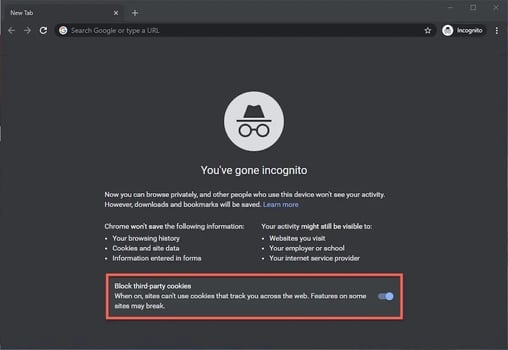
If Bridebook works correctly in Incognito Mode, the issue is likely being caused by your browser's cached data, cookies, or an extension. In this case, clearing your cache and cookies or temporarily disabling extensions may help.
### Need help?
If the issue continues even in Incognito Mode, please contact our Customer Support team through the link below. Include as much detail as possible about the issue you're experiencing, and we'll be happy to investigate further.
👉**[Contact Us](https://share.hsforms.com/1ZZN12s9aQoapXz9Dpu2Y0A1p8l9)**
- [About Bridebook](https://support.bridebook.com/en/about-bridebook?hsLang=en#main-content)
- [Who We Are](https://support.bridebook.com/en/about-bridebook?hsLang=en#who-we-are)
- [T&Cs & GDPR](https://support.bridebook.com/en/about-bridebook?hsLang=en#tcs-gdpr)
- [Tell Us What You Think](https://support.bridebook.com/en/about-bridebook?hsLang=en#tell-us-what-you-think)
- [Customer Service](https://support.bridebook.com/en/about-bridebook?hsLang=en#customer-service)
- [Join Bridebook Business](https://support.bridebook.com/en/join-bridebook-business?hsLang=en#main-content)
- [Getting Started](https://support.bridebook.com/en/join-bridebook-business?hsLang=en#getting-started)
- [About Bridebook Business](https://support.bridebook.com/en/join-bridebook-business?hsLang=en#about-bridebook-business)
- [Tiers and Premium Memberships](https://support.bridebook.com/en/tiers-and-premium-memberships?hsLang=en#main-content)
- [VenuePro](https://support.bridebook.com/en/tiers-and-premium-memberships?hsLang=en#venuepro)
- [SupplierPro](https://support.bridebook.com/en/tiers-and-premium-memberships?hsLang=en#supplierpro)
- [Essentials](https://support.bridebook.com/en/tiers-and-premium-memberships?hsLang=en#essentials)
- [Search Boost](https://support.bridebook.com/en/tiers-and-premium-memberships?hsLang=en#search-boost)
- [Limited Profile](https://support.bridebook.com/en/tiers-and-premium-memberships?hsLang=en#limited-profile)
- [Premium Tools and Features](https://support.bridebook.com/en/premium-tools-and-features?hsLang=en#main-content)
- [Special Offers](https://support.bridebook.com/en/premium-tools-and-features?hsLang=en#special-offers)
- [Advanced Analytics](https://support.bridebook.com/en/premium-tools-and-features?hsLang=en#advanced-analytics)
- [Couple Targeting](https://support.bridebook.com/en/premium-tools-and-features?hsLang=en#couple-targeting)
- [Real Weddings](https://support.bridebook.com/en/premium-tools-and-features?hsLang=en#real-weddings)
- [Edit My Profile](https://support.bridebook.com/en/edit-my-profile?hsLang=en#main-content)
- [Search Position](https://support.bridebook.com/en/edit-my-profile?hsLang=en#search-position)
- [Profile Details](https://support.bridebook.com/en/edit-my-profile?hsLang=en#profile-details)
- [My Network](https://support.bridebook.com/en/edit-my-profile?hsLang=en#my-network)
- [Wedding Fairs](https://support.bridebook.com/en/edit-my-profile?hsLang=en#wedding-fairs)
- [Reviews & Testimonials](https://support.bridebook.com/en/edit-my-profile?hsLang=en#reviews-testimonials)
- [Photos](https://support.bridebook.com/en/edit-my-profile?hsLang=en#photos)
- [Videos](https://support.bridebook.com/en/edit-my-profile?hsLang=en#videos)
- [Social Media](https://support.bridebook.com/en/edit-my-profile?hsLang=en#social-media)
- [Manage My Couples](https://support.bridebook.com/en/manage-my-couples?hsLang=en#main-content)
- [Couples Manager](https://support.bridebook.com/en/manage-my-couples?hsLang=en#couples-manager)
- [The Website Widget](https://support.bridebook.com/en/manage-my-couples?hsLang=en#the-website-widget)
- [Manage My Account](https://support.bridebook.com/en/manage-my-account?hsLang=en#main-content)
- [Account Settings](https://support.bridebook.com/en/manage-my-account?hsLang=en#account-settings)
- [My Subscription](https://support.bridebook.com/en/manage-my-account?hsLang=en#my-subscription)
- [Badges](https://support.bridebook.com/en/manage-my-account?hsLang=en#badges)
- [New Releases](https://support.bridebook.com/en/new-releases?hsLang=en#main-content)
- [Whats New?](https://support.bridebook.com/en/new-releases?hsLang=en#whats-new)
- [International Couples](https://support.bridebook.com/en/new-releases?hsLang=en#international-couples)
- [Webinars & Wedding Reports](https://support.bridebook.com/en/webinars-wedding-reports?hsLang=en#main-content)
- [Wedding Reports from previous years](https://support.bridebook.com/en/webinars-wedding-reports?hsLang=en#wedding-reports-from-previous-years)
- [Webinars](https://support.bridebook.com/en/webinars-wedding-reports?hsLang=en#webinars)
- [Troubleshooting](https://support.bridebook.com/en/troubleshooting?hsLang=en#main-content)
- [Bridebook Account](https://support.bridebook.com/en/troubleshooting?hsLang=en#bridebook-account)
- [Logging In](https://support.bridebook.com/en/troubleshooting?hsLang=en#logging-in)
- [Email Issues](https://support.bridebook.com/en/troubleshooting?hsLang=en#email-issues)
- [Browsers](https://support.bridebook.com/en/troubleshooting?hsLang=en#browsers)
- [Error Messages](https://support.bridebook.com/en/troubleshooting?hsLang=en#error-messages)
[](http://bridebook.co.uk)
43 Manchester Street, London, W1U 7LP
Copyright © 2025, Bridebook Business (Main Office)