![Group 20534 (1).png]](https://support.bridebook.com/hs-fs/hubfs/Group%2020534%20(1).png?height=20&name=Group%2020534%20(1).png)
Reviews are a fantastic way to showcase the quality of your service and build trust with couples searching for their perfect wedding venue or supplier!
Authentic feedback helps future couples feel confident in choosing your business and can help your profile stand out from the crowd.
How Couples Can Leave a Review 📝
Leaving a review is quick and easy for couples.
- Share your unique review link with your couples 🔗
You can find this under Reviews within the Your Profile tab of your Bridebook Business account. - Couples will then be guided through a short review form where they can share their experience with your business
How to View & Reply to Reviews 💬
You can view all submitted reviews directly from your Bridebook Business account.
- Go to your Reviews page to see all feedback in one place
- You can also reply to reviews directly from this page
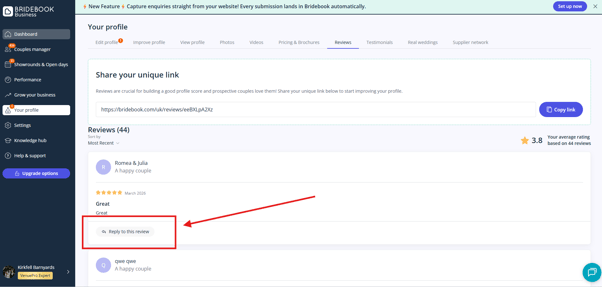
Please note: the ability to reply to reviews is currently available for:
- VenuePro Classic, Expert & Platinum members
- SupplierPro Classic members
Review Policy 📌
To ensure all reviews remain authentic and unbiased:
- Once a review has been submitted, it cannot be edited or removed by the couple
- This policy helps maintain the integrity of feedback on Bridebook and ensures couples can trust the reviews they read 🤝
If you believe a review breaches our guidelines (see link below), please report it! 🚩
Need help?
If there’s a typo, mistake, or you’re experiencing an issue with a review, please don’t hesitate to contact our Customer Support team!