---
title: "How to Customise Your Inbox: “Enter to Send”"
description: Customise your Bridebook inbox with the new Enter key setting. Choose whether Enter sends messages or adds a new line, tailored to your workflow.
---
[Skip to content](https://support.bridebook.com/en/how-to-customise-your-inbox-enter-to-send-#main-content)
English
Show submenu for translations
[Contact us](https://support.bridebook.com/en/kb-tickets/new?hsLang=en)
![Group 20534 (1).png\]](https://support.bridebook.com/hs-fs/hubfs/Group%2020534%20(1).png?height=20&name=Group%2020534%20(1).png)
- [Home](https://support.bridebook.com/en)
- [Products](https://support.bridebook.com/en/bridebook-tiers-membership-plans-)
- [Company](https://partners.bridebook.com/)
Open main navigation
Close main navigation
- [Home](https://support.bridebook.com/en)
- [Products](https://support.bridebook.com/en/bridebook-tiers-membership-plans-)
- [Company](https://partners.bridebook.com/)
- English
Show submenu for translations
- [Contact us](https://support.bridebook.com/en/kb-tickets/new)
- [Visit Bridebook Business](https://partners.bridebook.com/)
[Visit Bridebook Business](https://partners.bridebook.com/?hsLang=en)
Everything you need to know
- There are no suggestions because the search field is empty.
1. [Bridebook Business Support](https://support.bridebook.com/en?hsLang=en)
2. [Manage My Couples](https://support.bridebook.com/en/manage-my-couples?hsLang=en)
3. [Couples Manager](https://support.bridebook.com/en/manage-my-couples?hsLang=en#couples-manager)
# How to Customise Your Inbox: “Enter to Send”
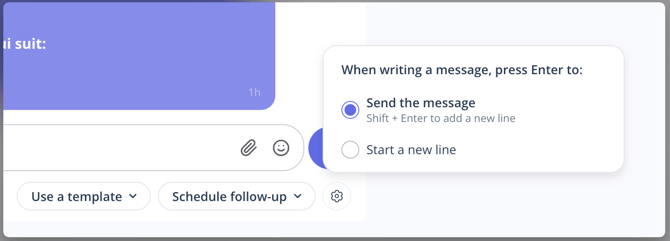
You can now choose what happens when you press the **Enter key** while writing a message:
- **Send the message instantly**
- **Start a new line** (for longer messages)
This update comes directly from supplier feedback, helping ensure the inbox works in a way that feels natural for you.
### ⚙️ How to change your settings:
- Open your **Inbox**
- Click into the message input field
- Select the **⚙️ Input options** (located just below the message box)
- Choose your preferred option:
- **Send the message**
- **Start a new line**
#### 👤 Is this setting saved?
Yes! ✅
- Your preference is **saved per user**
- Each team member can set their own preference
- No impact on other users within your business account
This update allows you to:
- Work faster if you prefer quick replies
- Write structured messages without accidental sends
#### 🚀 Top tips
- If you often send short replies → choose **“Enter to send”**
- If you write longer messages → choose **“Start a new line”**
- You can switch between options anytime
If you have any feedback on inbox features, **[we’d love to hear from you](https://business.bridebook.com/support/contact)** - your input helps us keep improving Bridebook 💙
- [About Bridebook](https://support.bridebook.com/en/about-bridebook?hsLang=en#main-content)
- [Who We Are](https://support.bridebook.com/en/about-bridebook?hsLang=en#who-we-are)
- [T&Cs & GDPR](https://support.bridebook.com/en/about-bridebook?hsLang=en#tcs-gdpr)
- [Tell Us What You Think](https://support.bridebook.com/en/about-bridebook?hsLang=en#tell-us-what-you-think)
- [Customer Service](https://support.bridebook.com/en/about-bridebook?hsLang=en#customer-service)
- [Join Bridebook Business](https://support.bridebook.com/en/join-bridebook-business?hsLang=en#main-content)
- [Getting Started](https://support.bridebook.com/en/join-bridebook-business?hsLang=en#getting-started)
- [About Bridebook Business](https://support.bridebook.com/en/join-bridebook-business?hsLang=en#about-bridebook-business)
- [Tiers and Premium Memberships](https://support.bridebook.com/en/tiers-and-premium-memberships?hsLang=en#main-content)
- [VenuePro](https://support.bridebook.com/en/tiers-and-premium-memberships?hsLang=en#venuepro)
- [SupplierPro](https://support.bridebook.com/en/tiers-and-premium-memberships?hsLang=en#supplierpro)
- [Essentials](https://support.bridebook.com/en/tiers-and-premium-memberships?hsLang=en#essentials)
- [Search Boost](https://support.bridebook.com/en/tiers-and-premium-memberships?hsLang=en#search-boost)
- [Limited Profile](https://support.bridebook.com/en/tiers-and-premium-memberships?hsLang=en#limited-profile)
- [Premium Tools and Features](https://support.bridebook.com/en/premium-tools-and-features?hsLang=en#main-content)
- [Special Offers](https://support.bridebook.com/en/premium-tools-and-features?hsLang=en#special-offers)
- [Advanced Analytics](https://support.bridebook.com/en/premium-tools-and-features?hsLang=en#advanced-analytics)
- [Couple Targeting](https://support.bridebook.com/en/premium-tools-and-features?hsLang=en#couple-targeting)
- [Real Weddings](https://support.bridebook.com/en/premium-tools-and-features?hsLang=en#real-weddings)
- [Edit My Profile](https://support.bridebook.com/en/edit-my-profile?hsLang=en#main-content)
- [Search Position](https://support.bridebook.com/en/edit-my-profile?hsLang=en#search-position)
- [Profile Details](https://support.bridebook.com/en/edit-my-profile?hsLang=en#profile-details)
- [My Network](https://support.bridebook.com/en/edit-my-profile?hsLang=en#my-network)
- [Wedding Fairs](https://support.bridebook.com/en/edit-my-profile?hsLang=en#wedding-fairs)
- [Reviews & Testimonials](https://support.bridebook.com/en/edit-my-profile?hsLang=en#reviews-testimonials)
- [Photos](https://support.bridebook.com/en/edit-my-profile?hsLang=en#photos)
- [Videos](https://support.bridebook.com/en/edit-my-profile?hsLang=en#videos)
- [Social Media](https://support.bridebook.com/en/edit-my-profile?hsLang=en#social-media)
- [Manage My Couples](https://support.bridebook.com/en/manage-my-couples?hsLang=en#main-content)
- [Couples Manager](https://support.bridebook.com/en/manage-my-couples?hsLang=en#couples-manager)
- [The Website Widget](https://support.bridebook.com/en/manage-my-couples?hsLang=en#the-website-widget)
- [Manage My Account](https://support.bridebook.com/en/manage-my-account?hsLang=en#main-content)
- [Account Settings](https://support.bridebook.com/en/manage-my-account?hsLang=en#account-settings)
- [My Subscription](https://support.bridebook.com/en/manage-my-account?hsLang=en#my-subscription)
- [Badges](https://support.bridebook.com/en/manage-my-account?hsLang=en#badges)
- [New Releases](https://support.bridebook.com/en/new-releases?hsLang=en#main-content)
- [Whats New?](https://support.bridebook.com/en/new-releases?hsLang=en#whats-new)
- [International Couples](https://support.bridebook.com/en/new-releases?hsLang=en#international-couples)
- [Webinars & Wedding Reports](https://support.bridebook.com/en/webinars-wedding-reports?hsLang=en#main-content)
- [Wedding Reports from previous years](https://support.bridebook.com/en/webinars-wedding-reports?hsLang=en#wedding-reports-from-previous-years)
- [Webinars](https://support.bridebook.com/en/webinars-wedding-reports?hsLang=en#webinars)
- [Troubleshooting](https://support.bridebook.com/en/troubleshooting?hsLang=en#main-content)
- [Bridebook Account](https://support.bridebook.com/en/troubleshooting?hsLang=en#bridebook-account)
- [Logging In](https://support.bridebook.com/en/troubleshooting?hsLang=en#logging-in)
- [Email Issues](https://support.bridebook.com/en/troubleshooting?hsLang=en#email-issues)
- [Browsers](https://support.bridebook.com/en/troubleshooting?hsLang=en#browsers)
- [Error Messages](https://support.bridebook.com/en/troubleshooting?hsLang=en#error-messages)
[](http://bridebook.co.uk)
43 Manchester Street, London, W1U 7LP
Copyright © 2025, Bridebook Business (Main Office)