![Group 20534 (1).png]](https://support.bridebook.com/hs-fs/hubfs/Group%2020534%20(1).png?height=20&name=Group%2020534%20(1).png)
What is Lead Capture?
Lead Capture helps venues bring external enquiries into Bridebook Business automatically.
Couples may find your venue through a range of different channels, such as Google, online directories, your website, or other external sources. Often, these enquiries land in a separate inbox and sit outside of Bridebook Business, which can make them harder to track and manage alongside your other leads.
Lead Capture gives your venue a unique Bridebook relay email address. This email address can be added anywhere couples currently contact you, such as your Google Business Profile, directory listings, or website contact form.
When a couple sends an enquiry to your Lead Capture email address, the message will appear in Couples Manager in your Bridebook Business account, alongside your other leads. These enquiries will be tagged as Lead Capture, so you can see that they came from an external source.
The most important thing to know is that Lead Capture does not replace your existing inbox. Couples can continue contacting you in the same way they do now, and you can still receive enquiries in your normal email inbox. Lead Capture simply helps make sure those enquiries are also visible in Bridebook Business.
Why should I use Lead Capture?
Lead Capture is designed to help you keep more of your enquiries in one place.
It can help you:
- Capture enquiries from external sources, such as Google, directories, and your website
- View more of your leads inside Bridebook Business
- Reduce the risk of enquiries being missed
- Understand where external enquiries are coming from
- Manage follow-ups more easily from Couples Manager
- Keep your current email process the same
Lead Capture is especially useful if you currently receive enquiries through multiple inboxes, website forms, or third-party listing sites.
How does Lead Capture work?
Each venue has a unique Lead Capture relay email address.
You can use this address in places where couples already contact you. For example, you may choose to add it to your website contact form, directory listings, or Google Business Profile.
Once an enquiry is sent to your Lead Capture address, it will appear in your Bridebook Business account in Couples Manager.
The couple does not need to do anything differently. From their side, the experience stays the same.
Where can I find Lead Capture in my Bridebook Business account?
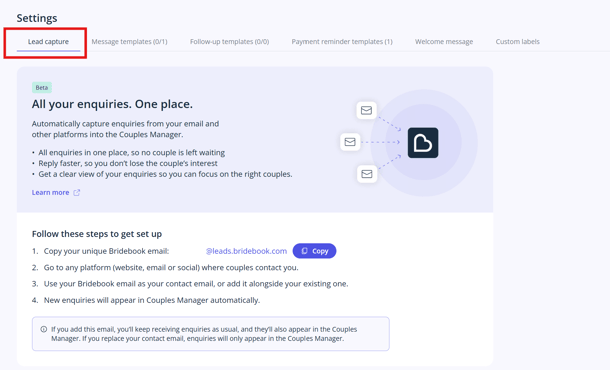
You can find your Lead Capture email address in your Bridebook Business account.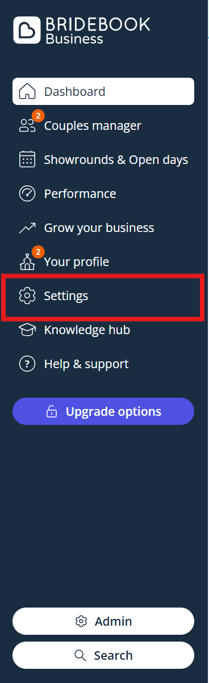
How to find your Lead Capture email address:
- Log in to your Bridebook Business account.
- Go to [insert location once confirmed].
- Select Lead Capture.
- Copy your unique Lead Capture relay email address.
Where should I use my Lead Capture email address?
You can add your Lead Capture email address anywhere couples currently contact your venue.
Common places include:
Google Business Profile
If couples find your venue through Google, you may be able to add your Lead Capture email address to your Google Business Profile contact details.
This can help enquiries from Google appear in Bridebook Business.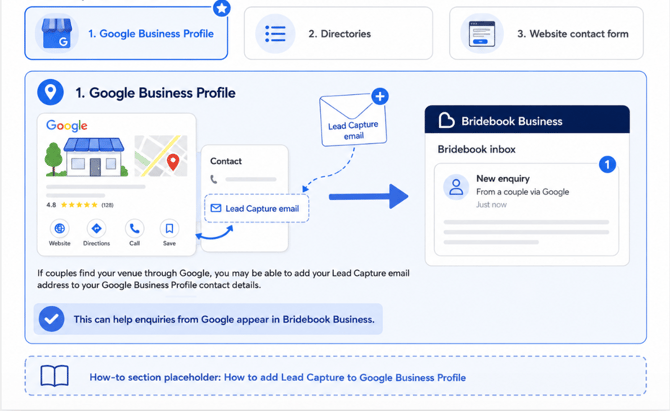
Directory listings
If your venue is listed on wedding directories or other third-party websites, you can add your Lead Capture email address as the contact email where possible.
This helps keep directory enquiries connected to your Bridebook Business account.
Website contact form
If your website has a contact form, you may be able to use your Lead Capture email address as the recipient email behind the form.
This means enquiries submitted through your website can appear in Bridebook Business automatically.
You may need support from your website provider or developer to update this.
Email forwarding
If you do not want to update your public listings straight away, email forwarding can be a simple first step.
You can set up an auto-forwarding rule from your existing inbox to your Lead Capture email address. This allows enquiries to continue arriving in your normal inbox while also appearing in Bridebook Business.
This is often the lowest-friction way to get started.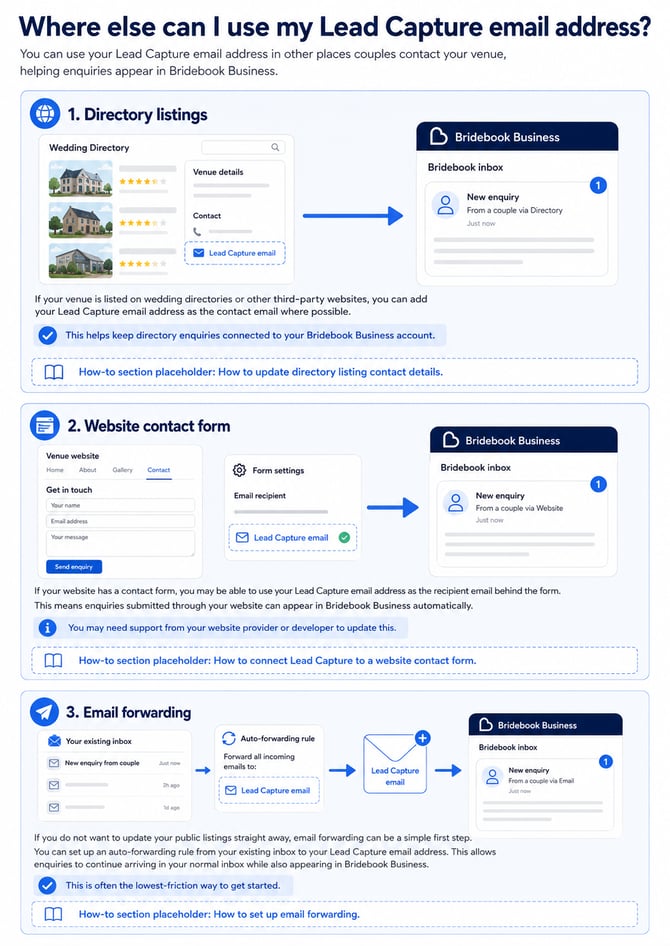
Important things to remember
-
Lead Capture does not replace your normal inbox.
-
It does not change how couples contact you.
-
It does not remove enquiries from your existing email account.
-
It simply helps external enquiries appear in Bridebook Business too, so you can manage more of your leads in one place.
-
Your Lead Capture email address receives enquiries into Bridebook Business. It should be used anywhere you want external enquiries to be captured in your Bridebook account.
FAQ's
Does Lead Capture replace my normal inbox?
No. You can continue using your normal inbox as usual.
Lead Capture simply helps those enquiries also appear in Bridebook Business.
Will couples notice anything different?
No. Couples can continue contacting you in the same way they do now.
Lead Capture works in the background to help bring those enquiries into Bridebook Business.
Do I need to update all my listings straight away?
No. You can start with one source first.
Email forwarding is often the easiest place to begin, as it allows you to keep your current setup while also sending enquiries into Bridebook Business.
Can I use Lead Capture with my website contact form?
Yes, if your website contact form allows you to choose the recipient email address.
You may need help from your website provider or developer to update this.
Can I use Lead Capture with Google Business Profile?
Yes, where Google allows you to add or update your contact email details.
Can I use Lead Capture with directories?
Yes. You can add your Lead Capture email address to directory listings where you are able to update your contact email.
Need any help setting up Lead Capture? Please get in touch with our Bridebook Business Support team here and we’ll be happy to help.