---
title: How to Use Lead Capture
description: Learn how Bridebook Lead Capture helps venues bring enquiries from Google, directories, websites and email forwarding into Bridebook Business, so leads are easier to track and manage in one place.
---
[Skip to content](https://support.bridebook.com/en/lead-capture#main-content)
- [English](https://support.bridebook.com/en/lead-capture)
- [Deutsch](https://support.bridebook.com/de/lead-erfassung-nutzen)
- [Polski](https://support.bridebook.com/pl/przechwytywanie-leadów-jak-to-dziala)
English
Show submenu for translations
[Contact us](https://support.bridebook.com/en/kb-tickets/new?hsLang=en)
![Group 20534 (1).png\]](https://support.bridebook.com/hs-fs/hubfs/Group%2020534%20(1).png?height=20&name=Group%2020534%20(1).png)
- [Home](https://support.bridebook.com/en)
- [Products](https://support.bridebook.com/en/bridebook-tiers-membership-plans-)
- [Company](https://partners.bridebook.com/)
Open main navigation
Close main navigation
- [Home](https://support.bridebook.com/en)
- [Products](https://support.bridebook.com/en/bridebook-tiers-membership-plans-)
- [Company](https://partners.bridebook.com/)
- - [English](https://support.bridebook.com/en/lead-capture)
- [Deutsch](https://support.bridebook.com/de/lead-erfassung-nutzen)
- [Polski](https://support.bridebook.com/pl/przechwytywanie-leadów-jak-to-dziala)
English
Show submenu for translations
- [Contact us](https://support.bridebook.com/en/kb-tickets/new)
- [Visit Bridebook Business](https://partners.bridebook.com/)
[Visit Bridebook Business](https://partners.bridebook.com/?hsLang=en)
Everything you need to know
- There are no suggestions because the search field is empty.
1. [Bridebook Business Support](https://support.bridebook.com/en?hsLang=en)
2. [New Releases](https://support.bridebook.com/en/new-releases?hsLang=en)
3. [Whats New?](https://support.bridebook.com/en/new-releases?hsLang=en#whats-new)
# How to Use Lead Capture
#### What is Lead Capture?
Lead Capture automatically brings enquiries from outside Bridebook Business into Couples Manager.
Whether couples find your venue through Google, your website, wedding directories or another source, Lead Capture helps keep those enquiries alongside your existing Bridebook leads.
Your venue has a unique **Lead Capture relay email address**. Simply add it anywhere couples currently contact you
When a couple sends an enquiry to your Lead Capture email address, it appears in **Couples Manager** and is tagged as **Lead Capture**, so you know it came from an external source.
> **Good to know:** Lead Capture doesn't replace your existing inbox. Couples contact you in exactly the same way as before, and you'll continue to receive enquiries in your normal email account. Lead Capture simply makes those enquiries visible in Bridebook Business too.
#### Why should I use Lead Capture?
Lead Capture helps you keep all your enquiries in one place, making it easier to stay organised and respond quickly.
With Lead Capture, you can:
- Capture enquiries from Google, your website and directory listings
- View more of your leads in Bridebook Business
- Reduce the chance of missing enquiries
- See where external enquiries are coming from
- Manage follow-ups in Couples Manager
- Keep your existing email process
#### How does it work?
1. Find your unique Lead Capture email address in Bridebook Business.
2. Add it wherever couples contact your venue.
3. External enquiries automatically appear in Couples Manager.
There's nothing new for couples to do—their experience stays exactly the same.
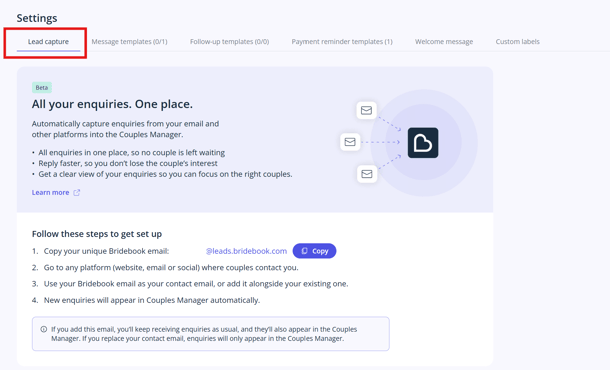
#### Find your Lead Capture email address:
1. Log in to your Bridebook Business account.
2. Go to **Settings**
3. Select [**Lead Capture**](https://business.bridebook.com/settings/lead-capture).
4. Copy your unique Lead Capture relay email address.
### Where should I use my Lead Capture email address?
You can use your Lead Capture email address anywhere couples already send enquiries.
#### Google Business Profile
If your Google Business Profile includes a contact email, update it to your Lead Capture email address.
#### Directory listings
If your venue is listed on wedding directories or other third-party websites, update your contact email to your Lead Capture email address where possible.
#### Website contact form
If your website contact form allows you to choose the recipient email address, use your Lead Capture email address.
*You may need your website provider or developer to make this change.*
#### Email forwarding
If you don't want to update your website or listings straight away, email forwarding is a great place to start.
Set up an automatic forwarding rule from your existing inbox to your Lead Capture email address. Your enquiries will continue arriving in your normal inbox while also appearing in Bridebook Business.
Many venues choose this option first before updating their other enquiry sources.
#### Key things to know
- Lead Capture doesn't replace your existing inbox.
- Couples won't notice any difference when they enquire.
- You can start with just one enquiry source and add more over time.
- Your existing email account will continue to receive enquiries.
- Lead Capture simply helps you manage more enquiries from one place.
#### Need help?
If you need a hand setting up Lead Capture, contact our Bridebook Business Support team **[here](https://share.hsforms.com/1ZZN12s9aQoapXz9Dpu2Y0A1p8l9)**and we’ll be happy to help.
- [About Bridebook](https://support.bridebook.com/en/about-bridebook?hsLang=en#main-content)
- [Who We Are](https://support.bridebook.com/en/about-bridebook?hsLang=en#who-we-are)
- [T&Cs & GDPR](https://support.bridebook.com/en/about-bridebook?hsLang=en#tcs-gdpr)
- [Tell Us What You Think](https://support.bridebook.com/en/about-bridebook?hsLang=en#tell-us-what-you-think)
- [Customer Service](https://support.bridebook.com/en/about-bridebook?hsLang=en#customer-service)
- [Join Bridebook Business](https://support.bridebook.com/en/join-bridebook-business?hsLang=en#main-content)
- [Getting Started](https://support.bridebook.com/en/join-bridebook-business?hsLang=en#getting-started)
- [About Bridebook Business](https://support.bridebook.com/en/join-bridebook-business?hsLang=en#about-bridebook-business)
- [Tiers and Premium Memberships](https://support.bridebook.com/en/tiers-and-premium-memberships?hsLang=en#main-content)
- [VenuePro](https://support.bridebook.com/en/tiers-and-premium-memberships?hsLang=en#venuepro)
- [SupplierPro](https://support.bridebook.com/en/tiers-and-premium-memberships?hsLang=en#supplierpro)
- [Essentials](https://support.bridebook.com/en/tiers-and-premium-memberships?hsLang=en#essentials)
- [Search Boost](https://support.bridebook.com/en/tiers-and-premium-memberships?hsLang=en#search-boost)
- [Limited Profile](https://support.bridebook.com/en/tiers-and-premium-memberships?hsLang=en#limited-profile)
- [Premium Tools and Features](https://support.bridebook.com/en/premium-tools-and-features?hsLang=en#main-content)
- [Special Offers](https://support.bridebook.com/en/premium-tools-and-features?hsLang=en#special-offers)
- [Advanced Analytics](https://support.bridebook.com/en/premium-tools-and-features?hsLang=en#advanced-analytics)
- [Couple Targeting](https://support.bridebook.com/en/premium-tools-and-features?hsLang=en#couple-targeting)
- [Real Weddings](https://support.bridebook.com/en/premium-tools-and-features?hsLang=en#real-weddings)
- [Edit My Profile](https://support.bridebook.com/en/edit-my-profile?hsLang=en#main-content)
- [Search Position](https://support.bridebook.com/en/edit-my-profile?hsLang=en#search-position)
- [Profile Details](https://support.bridebook.com/en/edit-my-profile?hsLang=en#profile-details)
- [My Network](https://support.bridebook.com/en/edit-my-profile?hsLang=en#my-network)
- [Wedding Fairs](https://support.bridebook.com/en/edit-my-profile?hsLang=en#wedding-fairs)
- [Reviews & Testimonials](https://support.bridebook.com/en/edit-my-profile?hsLang=en#reviews-testimonials)
- [Photos](https://support.bridebook.com/en/edit-my-profile?hsLang=en#photos)
- [Videos](https://support.bridebook.com/en/edit-my-profile?hsLang=en#videos)
- [Social Media](https://support.bridebook.com/en/edit-my-profile?hsLang=en#social-media)
- [Manage My Couples](https://support.bridebook.com/en/manage-my-couples?hsLang=en#main-content)
- [Couples Manager](https://support.bridebook.com/en/manage-my-couples?hsLang=en#couples-manager)
- [The Website Widget](https://support.bridebook.com/en/manage-my-couples?hsLang=en#the-website-widget)
- [Manage My Account](https://support.bridebook.com/en/manage-my-account?hsLang=en#main-content)
- [Account Settings](https://support.bridebook.com/en/manage-my-account?hsLang=en#account-settings)
- [My Subscription](https://support.bridebook.com/en/manage-my-account?hsLang=en#my-subscription)
- [Badges](https://support.bridebook.com/en/manage-my-account?hsLang=en#badges)
- [New Releases](https://support.bridebook.com/en/new-releases?hsLang=en#main-content)
- [Whats New?](https://support.bridebook.com/en/new-releases?hsLang=en#whats-new)
- [International Couples](https://support.bridebook.com/en/new-releases?hsLang=en#international-couples)
- [Webinars & Wedding Reports](https://support.bridebook.com/en/webinars-wedding-reports?hsLang=en#main-content)
- [Wedding Reports from previous years](https://support.bridebook.com/en/webinars-wedding-reports?hsLang=en#wedding-reports-from-previous-years)
- [Webinars](https://support.bridebook.com/en/webinars-wedding-reports?hsLang=en#webinars)
- [Troubleshooting](https://support.bridebook.com/en/troubleshooting?hsLang=en#main-content)
- [Bridebook Account](https://support.bridebook.com/en/troubleshooting?hsLang=en#bridebook-account)
- [Logging In](https://support.bridebook.com/en/troubleshooting?hsLang=en#logging-in)
- [Email Issues](https://support.bridebook.com/en/troubleshooting?hsLang=en#email-issues)
- [Browsers](https://support.bridebook.com/en/troubleshooting?hsLang=en#browsers)
- [Error Messages](https://support.bridebook.com/en/troubleshooting?hsLang=en#error-messages)
[](http://bridebook.co.uk)
43 Manchester Street, London, W1U 7LP
Copyright © 2025, Bridebook Business (Main Office)