---
title: Sign Up for Bridebook Business
description: "We're thrilled to welcome you to the Bridebook community! The process is simple: just head over to business.bridebook.com. As soon as you've filled out your details, an activation link will be sent st"
---
[Skip to content](https://support.bridebook.com/en/sign-up-for-bridebook-business#main-content)
- [English](https://support.bridebook.com/en/sign-up-for-bridebook-business)
- [Deutsch](https://support.bridebook.com/de/wie-erstelle-ich-ein-business-profil)
- [Français](https://support.bridebook.com/fr/comment-créer-un-profil-professionnel)
- [Polski](https://support.bridebook.com/pl/how-to-create-a-business-profile)
English
Show submenu for translations
[Contact us](https://support.bridebook.com/en/kb-tickets/new?hsLang=en)
![Group 20534 (1).png\]](https://support.bridebook.com/hs-fs/hubfs/Group%2020534%20(1).png?height=20&name=Group%2020534%20(1).png)
- [Home](https://support.bridebook.com/en)
- [Products](https://support.bridebook.com/en/bridebook-tiers-membership-plans-)
- [Company](https://partners.bridebook.com/)
Open main navigation
Close main navigation
- [Home](https://support.bridebook.com/en)
- [Products](https://support.bridebook.com/en/bridebook-tiers-membership-plans-)
- [Company](https://partners.bridebook.com/)
- - [English](https://support.bridebook.com/en/sign-up-for-bridebook-business)
- [Deutsch](https://support.bridebook.com/de/wie-erstelle-ich-ein-business-profil)
- [Français](https://support.bridebook.com/fr/comment-créer-un-profil-professionnel)
- [Polski](https://support.bridebook.com/pl/how-to-create-a-business-profile)
English
Show submenu for translations
- [Contact us](https://support.bridebook.com/en/kb-tickets/new)
- [Visit Bridebook Business](https://partners.bridebook.com/)
[Visit Bridebook Business](https://partners.bridebook.com/?hsLang=en)
Everything you need to know
- There are no suggestions because the search field is empty.
1. [Bridebook Business Support](https://support.bridebook.com/en?hsLang=en)
2. [Join Bridebook Business](https://support.bridebook.com/en/join-bridebook-business?hsLang=en)
3. [Getting Started](https://support.bridebook.com/en/join-bridebook-business?hsLang=en#getting-started)
# Sign Up for Bridebook Business
We’re thrilled to welcome you to the Bridebook community! Getting started is quick and simple - just follow the steps below:
#### 1. Go to the sign up page
👉 [**Bridebook Business Sign Up**](https://business.bridebook.com/login?_gl=1*1xnwkx1*_ga*MTYzMzc3MzM4My4xNzc5MTczNTM2*_ga_GM5GJ6SFMB*czE3NzkxNzM1MzUkbzEkZzAkdDE3NzkxNzM1MzUkajYwJGwwJGgxMjg2MDAwMjY1)
#### 2. Enter your details
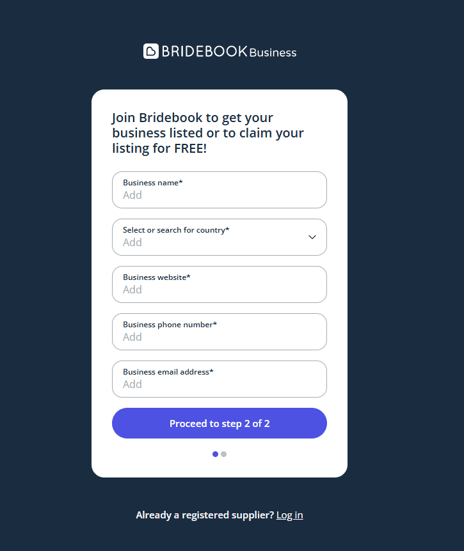
Fill out your business information in the signup form. This helps us set up your initial profile and connect you with relevant couples.
#### 3. Check your email
Once submitted, you’ll receive an **activation email** to your inbox. Please double check in spam/junk/promotional folders as it can occasionally end up there.
#### 4. Activate your account
Click the link in the email to activate your account. This will take you through to set up your login details.
#### 5. Create your login
Choose your preferred email (login) and password to access your Bridebook business account.
#### 6. Build your profile
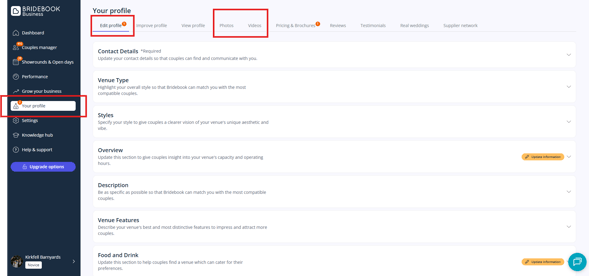
You’re in! 🎉 Now you can customise your profile and bring your business to life by adding:
- **📸 Photos & videos**
- **⭐ Reviews**
- **❓ FAQs**
- **🏰 Unique features and descriptions**
****
**💡 Helpful tip:** We suggest starting by heading to the **[Improve Profile](https://business.bridebook.com/profile/improve)** section and getting all the sliders into green - this boosts your profile score, which in turn helps push you higher in our search results.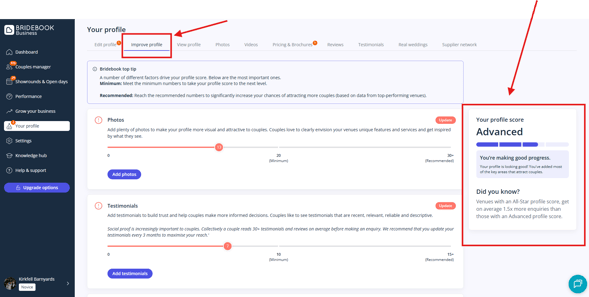
***Please note:** We’re unable to support multiple accounts under the same postcode.*
#### Ready to Upgrade? ⬆️
Explore our pricing plans and discover the features available on each tier below:
💒 **Venues: [Bridebook Venue Pricing](https://partners.bridebook.com/uk/pricing/venues?utm_source=chatgpt.com&hsLang=en)**
📸 **Suppliers: [Bridebook Supplier Pricing](https://partners.bridebook.com/uk/pricing/suppliers?hsLang=en)**
### Need help?
If you need help signing up or need any further support, our Customer Support team is always happy to help.
👉**[Contact Us](https://share.hsforms.com/1ZZN12s9aQoapXz9Dpu2Y0A1p8l9)**
- [About Bridebook](https://support.bridebook.com/en/about-bridebook?hsLang=en#main-content)
- [Who We Are](https://support.bridebook.com/en/about-bridebook?hsLang=en#who-we-are)
- [T&Cs & GDPR](https://support.bridebook.com/en/about-bridebook?hsLang=en#tcs-gdpr)
- [Tell Us What You Think](https://support.bridebook.com/en/about-bridebook?hsLang=en#tell-us-what-you-think)
- [Customer Service](https://support.bridebook.com/en/about-bridebook?hsLang=en#customer-service)
- [Join Bridebook Business](https://support.bridebook.com/en/join-bridebook-business?hsLang=en#main-content)
- [Getting Started](https://support.bridebook.com/en/join-bridebook-business?hsLang=en#getting-started)
- [About Bridebook Business](https://support.bridebook.com/en/join-bridebook-business?hsLang=en#about-bridebook-business)
- [Tiers and Premium Memberships](https://support.bridebook.com/en/tiers-and-premium-memberships?hsLang=en#main-content)
- [VenuePro](https://support.bridebook.com/en/tiers-and-premium-memberships?hsLang=en#venuepro)
- [SupplierPro](https://support.bridebook.com/en/tiers-and-premium-memberships?hsLang=en#supplierpro)
- [Essentials](https://support.bridebook.com/en/tiers-and-premium-memberships?hsLang=en#essentials)
- [Search Boost](https://support.bridebook.com/en/tiers-and-premium-memberships?hsLang=en#search-boost)
- [Limited Profile](https://support.bridebook.com/en/tiers-and-premium-memberships?hsLang=en#limited-profile)
- [Premium Tools and Features](https://support.bridebook.com/en/premium-tools-and-features?hsLang=en#main-content)
- [Special Offers](https://support.bridebook.com/en/premium-tools-and-features?hsLang=en#special-offers)
- [Advanced Analytics](https://support.bridebook.com/en/premium-tools-and-features?hsLang=en#advanced-analytics)
- [Couple Targeting](https://support.bridebook.com/en/premium-tools-and-features?hsLang=en#couple-targeting)
- [Real Weddings](https://support.bridebook.com/en/premium-tools-and-features?hsLang=en#real-weddings)
- [Edit My Profile](https://support.bridebook.com/en/edit-my-profile?hsLang=en#main-content)
- [Search Position](https://support.bridebook.com/en/edit-my-profile?hsLang=en#search-position)
- [Profile Details](https://support.bridebook.com/en/edit-my-profile?hsLang=en#profile-details)
- [My Network](https://support.bridebook.com/en/edit-my-profile?hsLang=en#my-network)
- [Wedding Fairs](https://support.bridebook.com/en/edit-my-profile?hsLang=en#wedding-fairs)
- [Reviews & Testimonials](https://support.bridebook.com/en/edit-my-profile?hsLang=en#reviews-testimonials)
- [Photos](https://support.bridebook.com/en/edit-my-profile?hsLang=en#photos)
- [Videos](https://support.bridebook.com/en/edit-my-profile?hsLang=en#videos)
- [Social Media](https://support.bridebook.com/en/edit-my-profile?hsLang=en#social-media)
- [Manage My Couples](https://support.bridebook.com/en/manage-my-couples?hsLang=en#main-content)
- [Couples Manager](https://support.bridebook.com/en/manage-my-couples?hsLang=en#couples-manager)
- [The Website Widget](https://support.bridebook.com/en/manage-my-couples?hsLang=en#the-website-widget)
- [Manage My Account](https://support.bridebook.com/en/manage-my-account?hsLang=en#main-content)
- [Account Settings](https://support.bridebook.com/en/manage-my-account?hsLang=en#account-settings)
- [My Subscription](https://support.bridebook.com/en/manage-my-account?hsLang=en#my-subscription)
- [Badges](https://support.bridebook.com/en/manage-my-account?hsLang=en#badges)
- [New Releases](https://support.bridebook.com/en/new-releases?hsLang=en#main-content)
- [Whats New?](https://support.bridebook.com/en/new-releases?hsLang=en#whats-new)
- [International Couples](https://support.bridebook.com/en/new-releases?hsLang=en#international-couples)
- [Webinars & Wedding Reports](https://support.bridebook.com/en/webinars-wedding-reports?hsLang=en#main-content)
- [Wedding Reports from previous years](https://support.bridebook.com/en/webinars-wedding-reports?hsLang=en#wedding-reports-from-previous-years)
- [Webinars](https://support.bridebook.com/en/webinars-wedding-reports?hsLang=en#webinars)
- [Troubleshooting](https://support.bridebook.com/en/troubleshooting?hsLang=en#main-content)
- [Bridebook Account](https://support.bridebook.com/en/troubleshooting?hsLang=en#bridebook-account)
- [Logging In](https://support.bridebook.com/en/troubleshooting?hsLang=en#logging-in)
- [Email Issues](https://support.bridebook.com/en/troubleshooting?hsLang=en#email-issues)
- [Browsers](https://support.bridebook.com/en/troubleshooting?hsLang=en#browsers)
- [Error Messages](https://support.bridebook.com/en/troubleshooting?hsLang=en#error-messages)
[](http://bridebook.co.uk)
43 Manchester Street, London, W1U 7LP
Copyright © 2025, Bridebook Business (Main Office)