![Bridebook-logo-blue (1)-1.png]](https://support.bridebook.com/hs-fs/hubfs/Bridebook-logo-blue%20(1)-1.png?height=20&name=Bridebook-logo-blue%20(1)-1.png)
💍 What Is a Wedding Website?
Your Bridebook Wedding Website is your personalised online space where you can share every important detail of your big day — all in one beautifully simple link.
No more juggling group chats, spreadsheets or multiple messages. With Bridebook, everything your guests need is in one organised, stylish, stress-free home.
💖 Why Couples Love It:
✅ All your details in one place
Share your schedule, venue info, accommodation, travel details, gift list and more.
🎨 Make it uniquely yours
Add photos, fun details, and personal messages that reflect your story and style.
🎁 Gift registry integration
Link your gift list so guests can easily browse and buy the perfect present.
✏️ Fully editable, anytime
Your plans can evolve — and your website can too. Update any detail instantly, even after sharing.
Why Your Guests Will Love It Too
📍 Everything they need, all in one place
No more lost invites or “What time is the ceremony?” messages — guests can access all the key details anytime, from any device.
🎁 Gift list made easy
Guests can browse and buy meaningful gifts directly from your page, saving them time and effort.
🎉 RSVP in seconds
With just a few taps, guests can confirm their attendance — making your guest list management effortless.
Even Better Design, Themes & Guest Experience
We’ve made major improvements to ensure your wedding website looks stunning for every guest.
🎨 More colours & themes
You now have 21 design variations across 9 themes
These new colours are inspired by the most popular wedding colour trends from the latest Bridebook Wedding Report.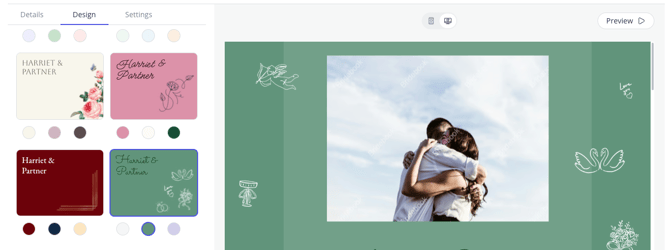
🖼️ Better photo display
-
Full flexibility when choosing photos
-
No more strange cropping or reordering
-
Cleaner layout for galleries and headers
📱 A smoother guest view
Your website is now beautifully responsive, meaning it adapts perfectly to any screen size — phone, tablet, laptop or desktop.
Sharing Your Website Just Got Better
We’ve introduced a new wedding website share link preview, making your website look more exciting and visual when shared on:
-
WhatsApp
-
SMS
-
Instagram
-
And other messaging platforms
This helps encourage more guests to click through and explore your website straight away.
Stay Organised, Stay Connected
Whether you’re planning a cosy celebration or a grand event, your Bridebook Wedding Website adapts to your needs.
-
Quick to set up
-
Beautifully designed
-
Easy to update
-
Great on all devices
More time for you to focus on what truly matters: celebrating your love.
Can I edit my website after sharing?
Absolutely! We understand that wedding plans can change, which is why Bridebook’s Wedding Website is fully editable, even after you've shared it with your guests. Enjoy the flexibility and peace of mind to update details as your big day takes shape.
✏️ Updating Your Wedding Website
🔧 What you can update
-
Your schedule & timeline
-
Ceremony or venue location
-
Accommodation recommendations
-
Travel info
-
Gift list
-
RSVP questions (e.g., dietary requirements, song requests)
-
Any text, photos or design elements
🔔 Will guests see updates?
Yes — instantly.
There’s no need to resend the link. Guests will always see the latest version automatically.
📱 Guest View: Your wedding website looks great on any device, whether your guests are browsing from their phones, tablets, or laptops. It’s simple, stylish, and user-friendly!
🔐 Securing Your Wedding Website With a Password
If you’d like a little extra privacy, Bridebook gives you the option to protect your wedding website with a password. This is perfect if you want to keep your details private and only accessible to your invited guests.
✨ How to add a password to your wedding website
-
Log in to your Bridebook account
-
Go to Planning
-
Select Wedding Website
-
Click on Privacy & Access
-
Toggle Website Password on
-
Create a password of your choice
Once enabled, guests will need this password to view your wedding website. You can share it with them however you prefer, such as via text, email, or on your invitations.
⚠️ Important to know
If you change your website password at any point, guests who previously had access may be locked out. You’ll need to let them know the new password so they can continue viewing your website without any issues.
Adding a password gives you peace of mind while keeping everything beautifully organised and accessible for the people who matter most 💖
Troubleshooting: Issues Uploading Photos?
If you see the message:
"Upload failed! Please refresh or try a different image"
try the following steps:
1. Check your internet connection
A temporary connection issue may interrupt the upload process. Refresh the page and try uploading the image again.
2. Reduce the image size
Images must be smaller than 8,000px in both width and height.
3. Use a supported file format
Make sure your image is saved in one of the following formats:
- .JPG
- .JPEG
- .PNG
👁️ Managing Visible Sections
To hide or show any section on your website:
-
Open your Wedding Website editor
-
Find the section you want to show or hide
-
Click the eye icon
-
Eye open = visible
-
Eye with a slash = hidden
-
-
Hidden sections won’t appear on your live site
-3.png?width=355&height=693&name=image%20(3)-3.png)
✨ Want to Share the Perfect Wedding Website?
With Bridebook, you can give guests everything they need - beautifully displayed - while keeping your planning stress-free.
Ready to personalise yours? 💍
Need help? Get in touch with our Customer Support Team.