---
title: Understanding Your Dashboard
description: Learn how the Bridebook Business Dashboard helps you manage enquiries, bookings, profile score and performance insights all in one place.
---
[Skip to content](https://support.bridebook.com/en/understanding-your-dashboard#main-content)
- [English](https://support.bridebook.com/en/understanding-your-dashboard)
- [Deutsch](https://support.bridebook.com/de/what-is-the-dashboard)
- [Français](https://support.bridebook.com/fr/what-is-the-dashboard)
- [Polski](https://support.bridebook.com/pl/what-is-the-dashboard)
English
Show submenu for translations
[Contact us](https://support.bridebook.com/en/kb-tickets/new?hsLang=en)
![Group 20534 (1).png\]](https://support.bridebook.com/hs-fs/hubfs/Group%2020534%20(1).png?height=20&name=Group%2020534%20(1).png)
- [Home](https://support.bridebook.com/en)
- [Products](https://support.bridebook.com/en/bridebook-tiers-membership-plans-)
- [Company](https://partners.bridebook.com/)
Open main navigation
Close main navigation
- [Home](https://support.bridebook.com/en)
- [Products](https://support.bridebook.com/en/bridebook-tiers-membership-plans-)
- [Company](https://partners.bridebook.com/)
- - [English](https://support.bridebook.com/en/understanding-your-dashboard)
- [Deutsch](https://support.bridebook.com/de/what-is-the-dashboard)
- [Français](https://support.bridebook.com/fr/what-is-the-dashboard)
- [Polski](https://support.bridebook.com/pl/what-is-the-dashboard)
English
Show submenu for translations
- [Contact us](https://support.bridebook.com/en/kb-tickets/new)
- [Visit Bridebook Business](https://partners.bridebook.com/)
[Visit Bridebook Business](https://partners.bridebook.com/?hsLang=en)
Everything you need to know
- There are no suggestions because the search field is empty.
1. [Bridebook Business Support](https://support.bridebook.com/en?hsLang=en)
2. [Edit My Profile](https://support.bridebook.com/en/edit-my-profile?hsLang=en)
3. [Profile Details](https://support.bridebook.com/en/edit-my-profile?hsLang=en#profile-details)
# Understanding Your Dashboard
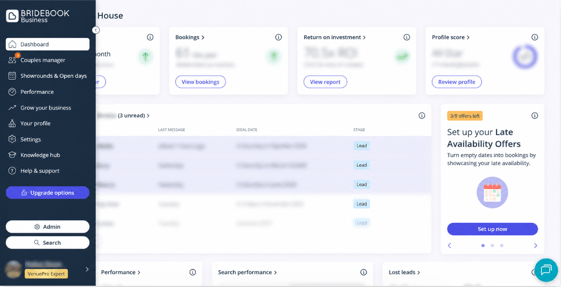
Your Dashboard is the first thing you’ll see when logging into Bridebook Business. It gives you a clear overview of your profile performance, enquiries, and activity - helping you manage your account efficiently and keep track of potential bookings.
You can think of the Dashboard as your main workspace, bringing together everything you need to monitor and manage your business on Bridebook in one place.
#### What You’ll Find on Your Dashboard
#### Enquiries 📩
View new, active, and outstanding enquiries from couples so you can respond quickly and keep conversations moving.
#### Search Position 🔍
See how your profile is currently performing within search results and understand your visibility to couples browsing Bridebook.
#### Bookings 📅
Track confirmed bookings and keep an overview of your conversion activity.
#### Profile Score ⭐
Your Profile Score helps indicate how complete and optimised your listing is. You’ll also see recommendations for areas that could be improved to help strengthen your profile.
#### Tasks ✔️
Stay organised with reminders and actions, such as replying to enquiries, updating profile information, or completing sections of your listing.
#### Couples Manager 💍
Manage all of your leads and couple conversations in one place for easier follow-up and organisation.
#### Search Performance 📈
Monitor how many couples are viewing and engaging with your profile through search results.
#### Couple Insights 👥
Gain insights into the couples interacting with your listing, including planning preferences and engagement trends.
---
#### Why Your Dashboard Matters
Your Dashboard is designed to help you stay on top of your business performance and make informed decisions about your profile activity.
Using it regularly can help you:
- Respond to enquiries more efficiently
- Identify opportunities to improve visibility
- Keep your profile complete and up to date
- Monitor engagement and booking activity
- Stay organised with day-to-day account management
---
#### Tips for Getting the Most Out of Your Dashboard
- Check your Dashboard regularly to stay updated on new enquiries and activity
- Keep your profile information current, including pricing, photos, and availability
- Use the Profile Score and Improve Profile sections to identify areas for optimisation
- Respond to enquiries promptly, as engagement can support overall profile performance and visibility
### Need help?
If you need help understanding any part of your Dashboard, our Customer Support team or your Account Manager will be happy to assist.
👉**[Contact Us](https://share.hsforms.com/1ZZN12s9aQoapXz9Dpu2Y0A1p8l9)**
***Please note:** Some of these features are only available to our **VenuePro Classic**, **Expert** & **Platinum** members & **SupplierPro Basic** & **Classic** members*
- [About Bridebook](https://support.bridebook.com/en/about-bridebook?hsLang=en#main-content)
- [Who We Are](https://support.bridebook.com/en/about-bridebook?hsLang=en#who-we-are)
- [T&Cs & GDPR](https://support.bridebook.com/en/about-bridebook?hsLang=en#tcs-gdpr)
- [Tell Us What You Think](https://support.bridebook.com/en/about-bridebook?hsLang=en#tell-us-what-you-think)
- [Customer Service](https://support.bridebook.com/en/about-bridebook?hsLang=en#customer-service)
- [Join Bridebook Business](https://support.bridebook.com/en/join-bridebook-business?hsLang=en#main-content)
- [Getting Started](https://support.bridebook.com/en/join-bridebook-business?hsLang=en#getting-started)
- [About Bridebook Business](https://support.bridebook.com/en/join-bridebook-business?hsLang=en#about-bridebook-business)
- [Tiers and Premium Memberships](https://support.bridebook.com/en/tiers-and-premium-memberships?hsLang=en#main-content)
- [VenuePro](https://support.bridebook.com/en/tiers-and-premium-memberships?hsLang=en#venuepro)
- [SupplierPro](https://support.bridebook.com/en/tiers-and-premium-memberships?hsLang=en#supplierpro)
- [Essentials](https://support.bridebook.com/en/tiers-and-premium-memberships?hsLang=en#essentials)
- [Search Boost](https://support.bridebook.com/en/tiers-and-premium-memberships?hsLang=en#search-boost)
- [Limited Profile](https://support.bridebook.com/en/tiers-and-premium-memberships?hsLang=en#limited-profile)
- [Premium Tools and Features](https://support.bridebook.com/en/premium-tools-and-features?hsLang=en#main-content)
- [Special Offers](https://support.bridebook.com/en/premium-tools-and-features?hsLang=en#special-offers)
- [Advanced Analytics](https://support.bridebook.com/en/premium-tools-and-features?hsLang=en#advanced-analytics)
- [Couple Targeting](https://support.bridebook.com/en/premium-tools-and-features?hsLang=en#couple-targeting)
- [Real Weddings](https://support.bridebook.com/en/premium-tools-and-features?hsLang=en#real-weddings)
- [Edit My Profile](https://support.bridebook.com/en/edit-my-profile?hsLang=en#main-content)
- [Search Position](https://support.bridebook.com/en/edit-my-profile?hsLang=en#search-position)
- [Profile Details](https://support.bridebook.com/en/edit-my-profile?hsLang=en#profile-details)
- [My Network](https://support.bridebook.com/en/edit-my-profile?hsLang=en#my-network)
- [Wedding Fairs](https://support.bridebook.com/en/edit-my-profile?hsLang=en#wedding-fairs)
- [Reviews & Testimonials](https://support.bridebook.com/en/edit-my-profile?hsLang=en#reviews-testimonials)
- [Photos](https://support.bridebook.com/en/edit-my-profile?hsLang=en#photos)
- [Videos](https://support.bridebook.com/en/edit-my-profile?hsLang=en#videos)
- [Social Media](https://support.bridebook.com/en/edit-my-profile?hsLang=en#social-media)
- [Manage My Couples](https://support.bridebook.com/en/manage-my-couples?hsLang=en#main-content)
- [Couples Manager](https://support.bridebook.com/en/manage-my-couples?hsLang=en#couples-manager)
- [The Website Widget](https://support.bridebook.com/en/manage-my-couples?hsLang=en#the-website-widget)
- [Manage My Account](https://support.bridebook.com/en/manage-my-account?hsLang=en#main-content)
- [Account Settings](https://support.bridebook.com/en/manage-my-account?hsLang=en#account-settings)
- [My Subscription](https://support.bridebook.com/en/manage-my-account?hsLang=en#my-subscription)
- [Badges](https://support.bridebook.com/en/manage-my-account?hsLang=en#badges)
- [New Releases](https://support.bridebook.com/en/new-releases?hsLang=en#main-content)
- [Whats New?](https://support.bridebook.com/en/new-releases?hsLang=en#whats-new)
- [International Couples](https://support.bridebook.com/en/new-releases?hsLang=en#international-couples)
- [Webinars & Wedding Reports](https://support.bridebook.com/en/webinars-wedding-reports?hsLang=en#main-content)
- [Wedding Reports from previous years](https://support.bridebook.com/en/webinars-wedding-reports?hsLang=en#wedding-reports-from-previous-years)
- [Webinars](https://support.bridebook.com/en/webinars-wedding-reports?hsLang=en#webinars)
- [Troubleshooting](https://support.bridebook.com/en/troubleshooting?hsLang=en#main-content)
- [Bridebook Account](https://support.bridebook.com/en/troubleshooting?hsLang=en#bridebook-account)
- [Logging In](https://support.bridebook.com/en/troubleshooting?hsLang=en#logging-in)
- [Email Issues](https://support.bridebook.com/en/troubleshooting?hsLang=en#email-issues)
- [Browsers](https://support.bridebook.com/en/troubleshooting?hsLang=en#browsers)
- [Error Messages](https://support.bridebook.com/en/troubleshooting?hsLang=en#error-messages)
[](http://bridebook.co.uk)
43 Manchester Street, London, W1U 7LP
Copyright © 2025, Bridebook Business (Main Office)