![Group 20534 (1).png]](https://support.bridebook.com/hs-fs/hubfs/Group%2020534%20(1).png?height=20&name=Group%2020534%20(1).png)
Planning to showcase your services at upcoming wedding fairs and events? Make sure couples can easily discover everything you have to offer on Bridebook Business.
How to Add Your Wedding Fair Listings ✨
1. Go to Your Profile
Log in to your Bridebook Business account and head to your dashboard.
2. Open the “Grow Your Business” Section
Click on the ‘Grow Your Business’ tab, then select ‘Wedding Fairs’ at the top of the page.
3. Add Your Event Details
Upload your wedding fair or event information, along with all the key details couples need to know about your services.
A complete listing helps increase visibility and gives couples more reasons to get in touch.
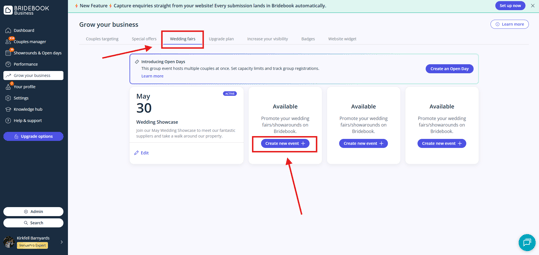
4. Get Seen by More Couples
Adding your events to the Wedding Fairs section helps boost your exposure and makes it easier for engaged couples to find and connect with your business.
Can I Add Multiple Wedding Fairs or Events?
Yes - you can add multiple Wedding Fairs or Events depending on your membership tier.
Need to make updates? Simply remove any past or outdated events to free up space for new listings. Once removed, you’ll be able to add and promote your latest fairs straight away.
Extra Promotion for Expert & Platinum Members
With VenuePro Expert and VenuePro Platinum, we can also help promote your events across our social media channels.
If you’d like to learn more, please contact your personal Account Manager or get in touch with our helpful Customer Support team here:
Please note: Some features are available exclusively to VenuePro Classic, Expert & Platinum members.