![Bridebook-logo-blue (1)-1.png]](https://support.bridebook.com/hs-fs/hubfs/Bridebook-logo-blue%20(1)-1.png?height=20&name=Bridebook-logo-blue%20(1)-1.png)
Searching for the perfect wedding venue is one of the most exciting parts of planning – but arranging viewings can sometimes involve a lot of back-and-forth.
That’s why we created the Showround Scheduler: an easy way to book venue viewings online directly through Bridebook.
What is the Showround Scheduler?
The Showround Scheduler is a user-friendly booking tool that allows you to:
-
See when a venue is available – no endless back-and-forth.
-
Send a viewing request in just a few clicks.
-
Receive SMS reminders so you don’t forget your appointment.
-
Share your details in advance (e.g., guest numbers or wedding style), so the venue can prepare for you.
-
Book showrounds across more countries than ever – now available in nine markets:
United Kingdom, Ireland, Germany, France, Switzerland, Austria, Australia, Canada, and South Africa. -
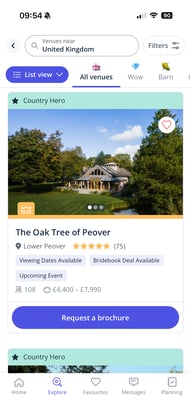
Spot venues with showrounds more easily, thanks to a new “Viewing Dates Available” label on venue search cards.
How it works
Step 1: Find a venue you love
Browse Bridebook until you find a venue you want to visit.
On the venue profile, you’ll see the option Book a Viewing.
You can now also access showround booking options from even more places, including:
-
Venue profiles
-
Your Favourites list
-
Search results (venues with showrounds display the “Viewing Dates Available” badge)
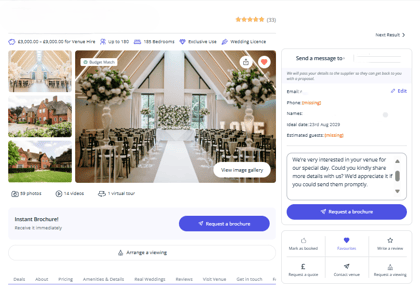
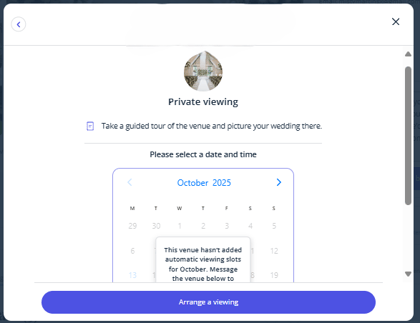
Step 2: Choose a suitable time
You’ll see all the time slots the venue has made available.
Simply pick the slot that works best for you – no long coordination required.
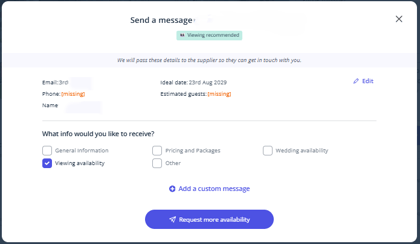
Step 3: Share some wedding details
You may be asked for a few quick details (e.g., approximate guest numbers or wedding style).
This helps the venue make your viewing personal and useful.
Step 4: Confirm your booking request
After selecting your time and adding your details, your request is sent to the venue.
Once the venue confirms, you’ll receive a confirmation email with all the information.
💡 You must be logged in to your Bridebook account to send and manage booking requests.
Step 5: Receive reminders
Before your visit, you’ll receive an SMS reminder from Bridebook to keep you on track.
If your plans change, you can easily cancel the viewing directly in your Bridebook account.
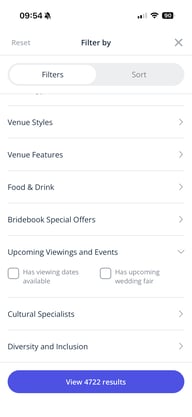
Filter venues offering showrounds
Couples can now filter venues by Showround availability using the Upcoming Events filter section.
With this update:
-
You can quickly find venues that have viewing slots available
-
You can also filter by Wedding Fairs, now expanded to:
United Kingdom, Germany, Australia, Canada, and South Africa
(previously only available in the UK and Germany)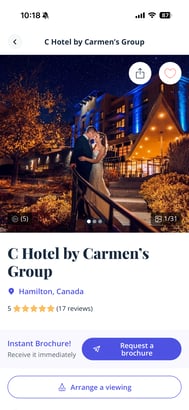
Why use the Showround Scheduler?
-
Fast: Book your slot in just a few clicks.
-
Organised: Manage all your viewings in one place.
-
Personal: The venue knows in advance what matters to you.
-
Reliable: Automatic reminders ensure no appointments are forgotten.
-
Expanded availability: Direct showround booking now works across nine global markets.
-
Smarter search: New labels and filters help you spot showround-ready venues instantly.
👉 Start searching for venues today and use the Showround Scheduler to plan your viewings.
One less thing on your to-do list – and one step closer to your perfect “I do” venue 💍