![Group 20534 (1).png]](https://support.bridebook.com/hs-fs/hubfs/Group%2020534%20(1).png?height=20&name=Group%2020534%20(1).png)
The ‘View My Profile’ feature allows you to see your business listing exactly as couples see it on Bridebook - across both desktop and mobile.
This is a useful way to review your profile from a couple’s perspective and make sure your listing is complete, accurate, and up to date.
Using this feature, you can preview:
- Your photo gallery
- Business description
- Pricing information
- Reviews and recommendations
- Venue or supplier details
- FAQs and profile content
How to View Your Profile
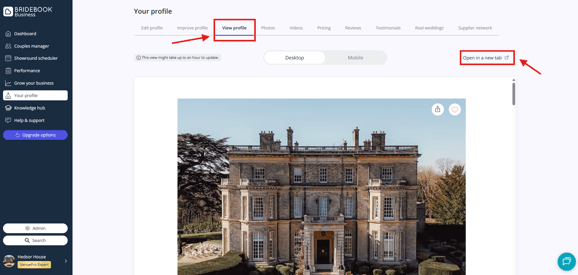
- Log in to your account at Bridebook Business
- Head to the ‘Your Profile’ tab on the left-hand side of your dashboard
- Find ‘View Profile’
- Select 'Open in new tab'
This will open the live version of your profile so you can review the full couple-facing experience.
Why This Feature Is Useful
Regularly reviewing your profile can help you:
- Spot missing or outdated information
- Check how your photos appear
- Review pricing visibility
- Ensure your profile looks professional on both desktop and mobile
- Understand the experience couples have when viewing your listing
Keeping your profile polished and complete can also support better engagement and visibility within search results.
You can additionally use the ‘Improve Profile’ section within your dashboard to identify areas that may need updating or optimisation.
Need help?
If you have any questions about your profile, need help reviewing your listing, or would like support optimising your account, our Customer Support team will be happy to help.