![Group 20534 (1).png]](https://support.bridebook.com/hs-fs/hubfs/Group%2020534%20(1).png?height=20&name=Group%2020534%20(1).png)
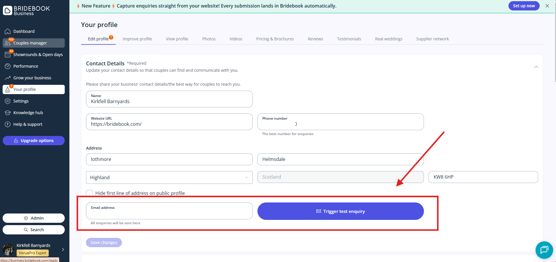
Your enquiry email address is where Bridebook sends email notifications when a couple submits an enquiry through your profile.
To view or update your enquiries email address:
- Log in to your Bridebook Business account.
- Select Your Profile from the menu on the left-hand side.
- Go to the Contact Details section.
- Update your enquiries email address as required.
- Click the blue Save button to apply your changes.
Please note: Only one enquiry email address can be added to your Bridebook profile at a time.
If multiple team members need to receive enquiry notifications, we recommend setting up email forwarding through your email provider. This allows enquiries sent to your Bridebook enquiries email address to be automatically forwarded to additional recipients.
Testing Your Email Address 📩
After updating your email address, it's a good idea to send a test enquiry to ensure notifications are being delivered correctly.
Need help?
If you're not receiving enquiry notifications after updating your email address, please contact our Customer Service team for assistance.