![Group 20534 (1).png]](https://support.bridebook.com/hs-fs/hubfs/Group%2020534%20(1).png?height=20&name=Group%2020534%20(1).png)
Invoices are sent monthly to the billing email address registered on your account from info@bridebook.com.
You can also view and download your invoices at any time directly from your Bridebook Business account.
View your invoices in Bridebook Business
To access your invoices:
- Log in to your Bridebook Business account.
- Open the user menu in the bottom-left corner.
- Select Invoices.
- Find the invoice you need.
- Choose to either view the invoice within Bridebook or download it to your device.
The Invoices page displays all invoices associated with the businesses you have access to. If you manage more than one business, you can therefore find all of your invoices in one place without switching between profiles.
You may also receive a notification in your Bridebook Business account when a new invoice is available. Select the bell icon in the sidebar to view your latest notifications.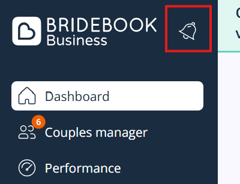
Please check the following:
- Invoices page: Open the user menu in the bottom-left corner of your Bridebook Business account and select Invoices.
- Billing email address: Check the inbox for the primary billing email address registered on your account.
- Spam or junk folder: Invoice emails may occasionally be filtered by your email provider.
- Sender address: Search your inbox for info@bridebook.co.uk, as this is the address used to send invoice emails.
- Business access: If you manage more than one business, check that you have access to the correct business through your login.
Need help finding an invoice?
If an invoice is missing or you are unable to access the Invoices page, please submit a request using the Contact Us link below.
To help us locate the correct invoice as quickly as possible, please include:
- Your business name
- Your Bridebook login email address
- The invoice date or billing period, if known
- Any other relevant details about your request