---
title: Understanding the Website Widget
description: Simply embed your Bridebook Lead Widget into your website. Our widget gives couples a direct path to your Couples Manager - keeping everything neatly in one place. Pick and choose what info you want c
---
[Skip to content](https://support.bridebook.com/en/understanding-the-website-widget#main-content)
- [English](https://support.bridebook.com/en/understanding-the-website-widget)
- [Deutsch](https://support.bridebook.com/de/anfrage-widget)
- [Français](https://support.bridebook.com/fr/comment-fonctionne-mon-widget-de-demandes-1)
- [Polski](https://support.bridebook.com/pl/how-does-my-enquiry-widget-work)
English
Show submenu for translations
[Contact us](https://support.bridebook.com/en/kb-tickets/new?hsLang=en)
![Group 20534 (1).png\]](https://support.bridebook.com/hs-fs/hubfs/Group%2020534%20(1).png?height=20&name=Group%2020534%20(1).png)
- [Home](https://support.bridebook.com/en)
- [Products](https://support.bridebook.com/en/bridebook-tiers-membership-plans-)
- [Company](https://partners.bridebook.com/)
Open main navigation
Close main navigation
- [Home](https://support.bridebook.com/en)
- [Products](https://support.bridebook.com/en/bridebook-tiers-membership-plans-)
- [Company](https://partners.bridebook.com/)
- - [English](https://support.bridebook.com/en/understanding-the-website-widget)
- [Deutsch](https://support.bridebook.com/de/anfrage-widget)
- [Français](https://support.bridebook.com/fr/comment-fonctionne-mon-widget-de-demandes-1)
- [Polski](https://support.bridebook.com/pl/how-does-my-enquiry-widget-work)
English
Show submenu for translations
- [Contact us](https://support.bridebook.com/en/kb-tickets/new)
- [Visit Bridebook Business](https://partners.bridebook.com/)
[Visit Bridebook Business](https://partners.bridebook.com/?hsLang=en)
Everything you need to know
- There are no suggestions because the search field is empty.
1. [Bridebook Business Support](https://support.bridebook.com/en?hsLang=en)
2. [Manage My Couples](https://support.bridebook.com/en/manage-my-couples?hsLang=en)
3. [The Website Widget](https://support.bridebook.com/en/manage-my-couples?hsLang=en#the-website-widget)
# Understanding the Website Widget
**Bring all your enquiries into one place with the Website Widget. Capture leads from your website, Bridebook, and more, track where they come from, and respond faster, all from one central inbox.**
Couples can discover your venue anywhere, your website, Google, directories.. but those enquiries often end up scattered across different platforms.
That leads to:
- Missed leads
- Slower responses
- No clear view of who’s interested
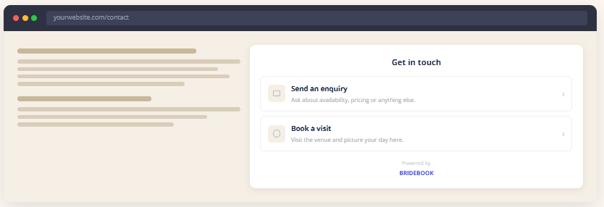
**Website Widget & Lead Capture brings everything together** into one place inside Bridebook Business, so you can manage, track, and respond to every enquiry with ease.
#### 💡 Why it matters
- **81% of couples** feel frustrated with slow responses at the start of their journey
- **79% of couples** book within 4 weeks of first contact
👉 The faster and clearer your response, the more likely you are to secure the booking.
#### 🌐 Website Widget
Most venues have a website, but not all give couples an easy way to take action when they land on it.
The **Website Widget** changes that.
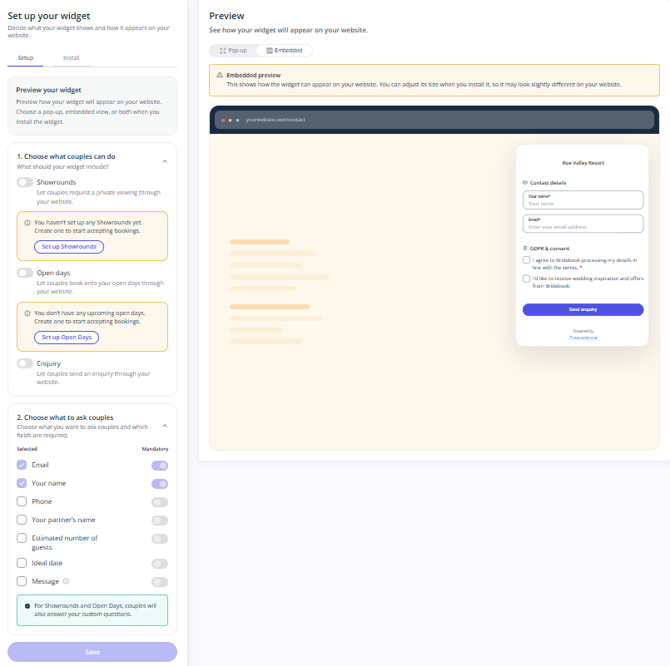
It allows couples to:
- Send an enquiry
- Book a showround
- Register for an Open Day
**All directly from your website.**
#### 📥 Everything in one place
Every enquiry - no matter where it comes from - lands in **Bridebook Business**.
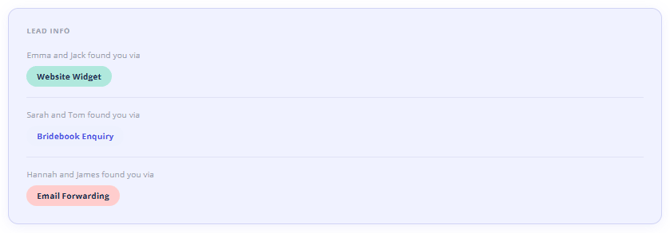
You’ll also see exactly where each lead came from:
- Website Widget
- Bridebook
- Email
**So you can:**
- Track performance
- Understand what’s working
- Prioritise your hottest leads
#### 📲 Instagram Integration
Your Website Widget is not just for your website - it also has its own unique URL that you can share anywhere couples might discover your venue, including Instagram.
Adding your Bridebook enquiry link to your Instagram bio gives couples a quick and seamless way to take action straight from your profile.
**Couples can use the link to:**
- Send an enquiry
- Book a showround
- Register for an Open Day
All without needing to leave the journey or search for your contact details elsewhere.
#### How to add your Bridebook link to Instagram
After you have created your Website Widget you can then add your unique Bridebook enquiry URL to your Instagram bio:
1. Copy your unique Bridebook Enquiry Hub link from Bridebook Business
2. Open Instagram and go to your venue’s profile
3. Tap **Edit profile**
4. Select **Links**
5. Tap **Add external link**
6. Paste your Bridebook enquiry URL
7. Add a title, such as **Enquire with us**, **Book a showround**, or **Wedding enquiries**
8. Save your changes
Once added, couples visiting your Instagram profile can click the link and go straight to your Bridebook enquiry form.
Every enquiry submitted through the link will land inside Bridebook Business, helping you keep Instagram leads connected, trackable, and easy to respond to.
💡 **Tip:** You can also share your Bridebook enquiry link in Instagram Stories, captions, highlights, or direct messages to make it even easier for couples to enquire.
#### 🔗 Want to add it to your website?
For a full step-by-step setup guide, click below:
[👉 **Bridebook Enquiry Widget Setup Guide**](https://support.bridebook.com/learnmore/enquirywidget/s/ukie?hsLang=en)
- [About Bridebook](https://support.bridebook.com/en/about-bridebook?hsLang=en#main-content)
- [Who We Are](https://support.bridebook.com/en/about-bridebook?hsLang=en#who-we-are)
- [T&Cs & GDPR](https://support.bridebook.com/en/about-bridebook?hsLang=en#tcs-gdpr)
- [Tell Us What You Think](https://support.bridebook.com/en/about-bridebook?hsLang=en#tell-us-what-you-think)
- [Customer Service](https://support.bridebook.com/en/about-bridebook?hsLang=en#customer-service)
- [Join Bridebook Business](https://support.bridebook.com/en/join-bridebook-business?hsLang=en#main-content)
- [Getting Started](https://support.bridebook.com/en/join-bridebook-business?hsLang=en#getting-started)
- [About Bridebook Business](https://support.bridebook.com/en/join-bridebook-business?hsLang=en#about-bridebook-business)
- [Tiers and Premium Memberships](https://support.bridebook.com/en/tiers-and-premium-memberships?hsLang=en#main-content)
- [VenuePro](https://support.bridebook.com/en/tiers-and-premium-memberships?hsLang=en#venuepro)
- [SupplierPro](https://support.bridebook.com/en/tiers-and-premium-memberships?hsLang=en#supplierpro)
- [Essentials](https://support.bridebook.com/en/tiers-and-premium-memberships?hsLang=en#essentials)
- [Search Boost](https://support.bridebook.com/en/tiers-and-premium-memberships?hsLang=en#search-boost)
- [Limited Profile](https://support.bridebook.com/en/tiers-and-premium-memberships?hsLang=en#limited-profile)
- [Premium Tools and Features](https://support.bridebook.com/en/premium-tools-and-features?hsLang=en#main-content)
- [Special Offers](https://support.bridebook.com/en/premium-tools-and-features?hsLang=en#special-offers)
- [Advanced Analytics](https://support.bridebook.com/en/premium-tools-and-features?hsLang=en#advanced-analytics)
- [Couple Targeting](https://support.bridebook.com/en/premium-tools-and-features?hsLang=en#couple-targeting)
- [Real Weddings](https://support.bridebook.com/en/premium-tools-and-features?hsLang=en#real-weddings)
- [Edit My Profile](https://support.bridebook.com/en/edit-my-profile?hsLang=en#main-content)
- [Search Position](https://support.bridebook.com/en/edit-my-profile?hsLang=en#search-position)
- [Profile Details](https://support.bridebook.com/en/edit-my-profile?hsLang=en#profile-details)
- [My Network](https://support.bridebook.com/en/edit-my-profile?hsLang=en#my-network)
- [Wedding Fairs](https://support.bridebook.com/en/edit-my-profile?hsLang=en#wedding-fairs)
- [Reviews & Testimonials](https://support.bridebook.com/en/edit-my-profile?hsLang=en#reviews-testimonials)
- [Photos](https://support.bridebook.com/en/edit-my-profile?hsLang=en#photos)
- [Videos](https://support.bridebook.com/en/edit-my-profile?hsLang=en#videos)
- [Social Media](https://support.bridebook.com/en/edit-my-profile?hsLang=en#social-media)
- [Manage My Couples](https://support.bridebook.com/en/manage-my-couples?hsLang=en#main-content)
- [Couples Manager](https://support.bridebook.com/en/manage-my-couples?hsLang=en#couples-manager)
- [The Website Widget](https://support.bridebook.com/en/manage-my-couples?hsLang=en#the-website-widget)
- [Manage My Account](https://support.bridebook.com/en/manage-my-account?hsLang=en#main-content)
- [Account Settings](https://support.bridebook.com/en/manage-my-account?hsLang=en#account-settings)
- [My Subscription](https://support.bridebook.com/en/manage-my-account?hsLang=en#my-subscription)
- [Badges](https://support.bridebook.com/en/manage-my-account?hsLang=en#badges)
- [New Releases](https://support.bridebook.com/en/new-releases?hsLang=en#main-content)
- [Whats New?](https://support.bridebook.com/en/new-releases?hsLang=en#whats-new)
- [International Couples](https://support.bridebook.com/en/new-releases?hsLang=en#international-couples)
- [Webinars & Wedding Reports](https://support.bridebook.com/en/webinars-wedding-reports?hsLang=en#main-content)
- [Wedding Reports from previous years](https://support.bridebook.com/en/webinars-wedding-reports?hsLang=en#wedding-reports-from-previous-years)
- [Webinars](https://support.bridebook.com/en/webinars-wedding-reports?hsLang=en#webinars)
- [Troubleshooting](https://support.bridebook.com/en/troubleshooting?hsLang=en#main-content)
- [Bridebook Account](https://support.bridebook.com/en/troubleshooting?hsLang=en#bridebook-account)
- [Logging In](https://support.bridebook.com/en/troubleshooting?hsLang=en#logging-in)
- [Email Issues](https://support.bridebook.com/en/troubleshooting?hsLang=en#email-issues)
- [Browsers](https://support.bridebook.com/en/troubleshooting?hsLang=en#browsers)
- [Error Messages](https://support.bridebook.com/en/troubleshooting?hsLang=en#error-messages)
[](http://bridebook.co.uk)
43 Manchester Street, London, W1U 7LP
Copyright © 2025, Bridebook Business (Main Office)